When you assume… May 18, 2011
Posted by Jill (@bonnjill) in Business practices, Random musings.7 comments
You all know the saying – and for those of you who don’t… “When you assume, you make an ass out of you and me.” I don’t know what is in the air today, but I have had two clients send me files for translation (needed back as soon as possible – of course) assuming I am available. One particular client in the Czech Republic sent me an e-mail at 2:30 in the morning (8:30 a.m. in Europe) and his colleague in China proceeded to send me the files to work on – and the files again because they had been updated and could I please use them. BTW, this was a client I fired last year… The second one just sent a PDF with the text they needed highlighted in a red box. Lots of single words (I think the context is chemistry but I’m not sure. And I don’t do chemistry.) in a QA form with no other context. And it isn’t even noon yet!
I am waiting on a large job that I was booked for two days ago, so I politely thanked both clients and told them that I was unfortunately booked and unavailable.
The grass is not necessarily greener on the other side… May 16, 2011
Posted by Jill (@bonnjill) in Business practices, Random musings.4 comments
I did a really dumb thing last week – I switched Internet service providers. I have been unhappy with my Internet connection through Time-Warner Cable for a while now. It has never been very fast and recently it started kicking me offline 3 to 4 times a day. The connection would be glacial until I was booted offline. I would then have to reboot my cable modem and router. I called a service tech, who came out and told me I was losing the connection somewhere on the line, but he never actually fixed the problem and I never heard from TWC again.
I was ripe for the pickin’ when a U-Verse salesperson came door-to-door in early May. I decided to sign up for Internet and cable through U-Verse. I should have left well enough alone…
After two install no-shows and numerous phone calls to “customer service” in which they told me they could install it in a little over a week I tweeted my frustration and a rep from AT&T contacted me and scheduled an install two days later. The tech showed up on-time and things looked promising. I loved the U-Verse set-up and the DVR that allowed me to watch the shows in the living room or the bedroom. The tech had problems getting one computer online, but Susanne Aldridge III quickly helped me solve that problem. The only problem that remained was my inability to send e-mail from my e-mail program.
Then my landlady came home from work – and had no phone or Internet service. After calling the supervisor and Mike at HQ I had two techs back at the house to fix the problem. They had turned off her service when mine was installed because there was a mix-up with our addresses. When they left everything looked great.
And then everything went to hell. My landlady had her Internet turned off Friday night, and after calling AT&T Saturday morning and them confirming everything with me I woke again an hour later to find I had no cable or Internet – and neither did she. She was on the phone with them for 2 hours and I was on hold for an hour trying to figure this out. Turns out some yahoo turned off our services pending “address verification” and it would take 48-72 hours (business hours – so starting Monday) to get service turned back on. As you all know, we can’t work without Internet so I called Time-Warner Cable in tears begging them to take me back and had a tech out this afternoon (Monday) who reinstalled everything. In the meantime, AT&T also turned off my landlady’s phone service in addition to her DSL. It was a looooong weekend…
Everything is working on my end again, and I am shipping the U-Verse equipment back first thing in the morning. I have a new “drop” (the technical term for the line from the pole to the house), so my Internet connection appears to be faster. I don’t have a DVR, but I can watch cable in my bedroom through my old VCR. I’m not complaining, because TWC’s customer service is a million times better than AT&T’s. I’ll live with it.
My landlady went out and bought a pay-as-you-go cell phone, and I will be hooking her into my Internet tomorrow until AT&T fixes her service. She is considering telling them to go fly a kite too.
So the moral of this story is even though it may seem like it, the grass is not necessarily greener on the other side. At least my blood pressure is back down, and I am calmer again.
Update: My landlady now has her phone and Internet working, but it took a week!!! That is simply unacceptable in this day and age.
TGIF: TAHIT Public Service Announcement May 13, 2011
Posted by Jill (@bonnjill) in TGIF.3 comments
Tess Whitty tweeted this link to a very moving video showing the importance of interpreters last week. The Texas Association of Healthcare Interpreters and Translators (TAHIT) produced this video to demonstrate how important healthcare interpreters are. It’s a TGIF video, but it most certainly isn’t categorized here under “Fun stuff” like most of my TGIF videos are. Still, it does a fantastic job showing to Americans who may not be sympathetic to the plight of immigrants just how important interpreters are by pulling at their heartstrings.
10 Technology Tips You Can Start Using Today – Michael Wahlster @ TCD May 12, 2011
Posted by Jill (@bonnjill) in ATA, Tech tips, Tools.3 comments
Although I enjoyed all of the presentations I attended at the TCD conference in DC, Michael Wahlster’s presentation on technology tips was my favorite. As Corinne has already mentioned, he used a new presentation technique called zooming presentation through Prezi. He basically had one file and zoomed in and out to the various points he was making. It was quite impressive. Anyway, despite being a huge tech geek even I walked away with quite a few things I want to look into.
* VoIP (Voice over Internet Protocol)
He talked a lot about Skype. I already use Skype for video conference or working with colleagues to ask quick questions about particularly troublesome sentences in the Chat feature, but Skype offers so much more. Some Skype-enabled phones work like a cordless phone through a router. It also allows you to forward your calls to an overseas number or gives you worldwide dial-in phone numbers (so you can live in Kansas and have a phone number in Japan) and block phone spam. SkypeIn allows you to select your area code (almost anything, but if you want the cachet of the 212 Manhattan area code you’re out of luck). With Skype2Go you can call from your regular cell phone anywhere in the world, many countries for only 2.3 cents a minute.
Since the presentation, it was reported that Microsoft is going to purchase Skype for 8.5 billion dollars. This raises the question if Skype is going to survive in the long run as the largest telephony company in the world with all the advantages it has now. There is a tendency among big tech companies to buy niche companies, take their best technologies and let the rest die. But Skype, a Luxemburg-based company, has been there before when it was purchased by eBay. It was involved in a lawsuit with eBay and the auction house threatened to pull the plug on Skype. Skype survived. Perhaps very cautious optimism is called for.
Google Voice is also a good option, although it doesn’t offer as many benefits as Skype. One plus is that it allows you to flag a phone number as spam (great if you want to ignore calls from an ex or a particularly bothersome client who won’t take no for an answer). Once the number is flagged you no longer have to see when the person calls.
* DNS (domain name service)
If you have had problems connecting to the Internet it may be your ISP’s domain name service, so Michael suggested we look into OpenDNS. It is faster and more reliable than most ISP’s. It makes your network more secure and reliable. Using OpenDNS means you enter their IP address is in your router or your network setup – not the one assigned to you by your ISP. It offers Web content filtering, so it is good for parents who want to filter their children’s access to content. It’s not an Internet service – it’s a IP translation service.
* Encryption
Encryption allows you to protect your own data assets, protect e-mail attachments and most importantly protect client confidentiality. With encryption you can make all or part of your hard drive invisible. Michael stressed that laptops must be encrypted, because they can walk away so easily. “Storing data in the cloud without encryption is like storing your suitcase in a locker in the airport without turning the key.” Encryption ensures that your data is secure. He recommends Truecrypt, which offers on-the-fly encryption and “plausible deniability” (for the advanced paranoid, if you want to protect data even in cases where you may be forced to reveal your password).
* Passwords
Michael suggests we use a password manager to keep track of all the various passwords we create for various websites. Passwords should always be at least 12 characters (using capital and lowercase letters, symbols instead of letters, special characters, etc.). You should create a strong passphrase for the password manager that only you know. Michael’s example was the common Latin phrase Gallia est omnis divisa in partes tres, which he shortened to Ge0d!p3 (using the number zero for the o and the ! for the i). Keepass is the tool he recommends. Keepass is a “free, open source, light-weight and easy-to-use password manager.” It stores all your passwords together and all you have to do is remember your one passphrase. He also urged us not to write down our passwords and not use personal information like birthdays, spouse or pet names, etc.
* Sharing + Collaboration
Most of us collaborate with each other and storing the files on the cloud can make life a lot simpler. Dropbox is the tool Michael (and I) recommend. Dropbox is a folder system that stores your data online (in “the cloud”). I use Dropbox to move files and folders between my desktop PC and my laptops. Michael suggested storing files such as your music and photos so you can use it at any computer. I export my TMs to Dropbox as a back-up beyond my data back-up system (more on that later). You can also use Dropbox to share files with colleagues and ensure everyone is using the latest version. If someone is using the file in the Dropbox folder the file is locked. The first 2 GB is free; anything over and above that you pay for. The nice thing about Dropbox is you can drag and drop files to the Dropbox folder. I also have Dropbox installed on my smartphone.
* Note Taking
You can use note taking software tools to save text, links, URLs, images, sounds, etc. No more Post-it notes littering your monitor screen or desk. Michael recommended Evernote (60 MB per month limit for the free version), but MS OneNote comes standard on most computers nowadays. The thing that intrigues me about Evernote is you can also sync it with your smartphone.
* Text Editors
Text editors go beyond the capacity of Notepad. They allow you to open plain text files and the formatting and tags are usually highlighted in another color (useful when you are handcoding or translating HTML files). Michael uses Notepad++. I like using UltraEdit.
* Uninterrupted Power Supply (not just battery back-up)
This is probably one of the most important tech tips you should know about. It is extremely important to have an uninterrupted power supply in case the power goes out, because a UPS allows you to back up the files you are working on and close the computer down in the event of a power outage. Battery back-ups take a split-second to switch over, which is usually not long enough for a computer. This avoids loss of the files you are working on. Michael suggested you buy as large a UPS as possible. I just bought replacement batteries for my UPSes the week before the conference. They are important!
* Data Backup
It is important to back up your data both to an external hard drive and to “the cloud” (aka the Internet). Backing up your data off-site is important in case there is a robbery (they will most likely steal your hard drive as well), fire, flood or other natural disaster. The two most trusted back-up systems are Carbonite and Mozy. You should remember to back up your files for your clients and don’t forget critical files like your TMs or other work products. I wrote a detailed post here about the importance of data backup back in January.
* Infections
Every translator should have an anti-virus program and malware/spyware removal programs running on their computer. I use a combination of AdAware and Spybot Search & Destroy. If your computer is running slowly the first thing you should do is run some malware/spyware removal programs on it. I also really like CCleaner to make my computer run faster and more efficiently. Michael talked about ComboFix, but urged us to be very careful when using it because it finds amazing things but erases everything suspicious (his quote was RTFM!).
Duden Online May 6, 2011
Posted by Jill (@bonnjill) in Tools, Translation Sites.6 comments
German translators, rejoice! Since early May Duden has put its Duden Rechtschreibung and Deutsches Universalwörterbuch online for us to use – free of charge at www.duden.de. If you want to look up a word, check its correct spelling, or learn more about its meaning or etymology the Duden is the reference work of choice. It is one of Germany’s most respected line of grammar books. The Duden was first published by Konrad Duden in 1880. The Duden is updated regularly, with new editions appearing every four or five years. It is currently in its 25th edition and published in 12 volumes, covering different aspects of grammar like spelling, foreign words, pronunciation, synonyms, quotes and idioms (those are just the volumes I own).
TGIF: Ducati and Xerox May 5, 2011
Posted by Jill (@bonnjill) in Fun stuff, TGIF.add a comment
This video was shared on the GLD list the other day. It makes fun of the ridiculous demands we translators sometimes hear. Ducati focuses on the bikes, while Xerox focuses on the technical communications – and that’s the way it should be.
King of the hermits May 3, 2011
Posted by Jill (@bonnjill) in Fun stuff.2 comments
One of the cartoons I regularly subscribe to is Adam@Home (the link is listed in the column to the right). It features Adam, who works from home and is addicted to coffee like many of us. Today’s cartoon made me chuckle, and I have a feeling it will make my self-employed compatriots chuckle too. If for some reason you can’t read it you can view it here.

ATA-TCD conference wrap-up May 3, 2011
Posted by Jill (@bonnjill) in ATA, Business practices.3 comments
Seventy of the industry’s top freelancers and translation agencies attended the ATA’s Translation Company Division Business of Translation conference in Washington D.C. this past weekend. The focus of the conference was on business practices. The TCD opened up its conference to freelance translators for the first time and featured two session tracks, one for freelancers and one for agencies. Many people complain that the ATA allows agencies to be members, but I think it makes perfect sense. Although there are some behemoth translation agencies out there, many agencies are one- or two-people operations. In fact, many freelancers sometimes subcontract work when they have too much or have a client who needs a language that they don’t work in, essentially making them function as agencies themselves. The line is so fluid that I don’t feel we can or should draw a line.
I also wholeheartedly believe that the smaller ATA regional conferences offer more bang for your buck. I met two of my most valuable clients at the ATA Working for the Federal Government conference in DC back in 2004, and one of them still accounts for 25% of my income and is my favorite client (the other one is no longer in business). The smaller conferences allow you to network more and really get to know each other. Don’t get me wrong – I still love the Annual Conference, but the size of it can be intimidating and doesn’t ideally lend itself to really meeting potential clients. You exchange business cards and a potential client picks up your resume from the 100s of resumes on the Job Exchange table, but at the smaller conferences you can sit down with a potential client and truly devote time to getting to know them and what they need.
The TCD conference is without a doubt the best conference I have ever attended. Every single presentation I attended had outstanding and eye-opening content and really made me think about my business practices. Chris Durban was the keynote speaker and literally (!!) threw down the gauntlet (in this case a gardening glove) and urged us to stand behind our work and sign it. She was funny and kept our attention from start to finish with her description of a Mystery Shopping exercise where she hired 5 agencies to translate a small French text into English. The resulting work examples she shared made me confident of the quality I offer to my clients. And we were just getting started…
If you take away just one new idea you can view a conference as successful. I had many this weekend and will be sharing them over the next few days. One “aha moment” for me was a comment Ana Iaria made during Chris’ session on “10 Habits of Translators Who Prosper as Freelancers” in which she suggested freelancers take an hour lunch break to run errands and/or grab a bite to eat as if you were working in a proper office. It seems simple, but I think it will really change things for the better for me. When I get too overwhelmed I frequently let errands slide or forget to eat. I intend to implement this tip right away and see what a difference it will make.
The beauty of working from home April 29, 2011
Posted by Jill (@bonnjill) in Business practices, Random musings.11 comments
I am sitting in my hotel room after the Welcome Reception for the ATA’s TCD conference. Corinne McKay gave me and several others signed second editions of her popular book, How to Succeed as a Freelance Translator (hot-off-the-press – it’s not yet available for sale but it will be very soon). After staying up late last night to finish translating a particularly tricky contract and packing to then wake up early to fly to DC I declined joining several friends for dinner, choosing to crash in the hotel. I started reading the book, and something in her Introduction resonated enough with me that I wanted to immediately blog about it. She talks about work-from-home opportunities and how translation is one of the few legitimate work-from-home careers. The sentence “…working from home, you’ll probably experience greater job satisfaction and less stress, since a relatively minor disruption like a dentist appointment or furnace repair won’t derail your entire work day.” made me say “right on!”
I recently experienced this first-hand. Wednesday night my Internet kept going down and was running at an average of 36 MPbs. Repeated reboots of the cable modem and router – and even my computers – were unable to speed up the connection. Frustrated, I turned the computer off, hoping it was a momentary upgrade problem. Thursday morning things hadn’t improved, so I called my cable Internet provider to complain. The service rep checked the line and agreed that I did have a problem. He offered to send a tech out, but he noted with some trepidation in his voice that he wasn’t sure when the tech could come out and I would need to be home the whole day, possibly as late as 8 PM. I cheerfully informed him that that wasn’t a problem because I worked from home and urged him to put me as high on the list as possible since I depend on the Internet for my job. Luckily I didn’t have to wait all day. The tech was there within a half an hour and even though he didn’t find the cause of the problem and would have to come back later to check the cable on the telephone pole the Internet was somewhat more stable after he left and I was able to work again.
If I worked in an office this scenario could have never been possible. I would have had to take a vacation day to be home to let him in, and he wouldn’t have been able to fit me in so quickly in the day. I was already home, so the tech was able to immediately come by.
As Corinne so aptly states, the beauty of working from home as freelance translators is that we can structure our work day around our peak energy times and family needs, rather than our employer and its policies. I particularly love working from home in the winter, when my commute on snowy days is from the bedroom to the coffeemaker to the office, where I read all kinds of irate tweets and status updates from people complaining about their commutes and the weather. And in the summer I can take some time off at any time to take the dog for a walk. You really can’t beat it… and I wouldn’t exchange it for anything.
Favorite tools: Search and Replace April 20, 2011
Posted by Jill (@bonnjill) in Tech tips, Tools.2 comments
One of my German friends/colleagues complained on Facebook yesterday that she was proofreading files and the translator had changed Vereinigtes Königreich (United Kingdom) to Groß Britannien (Great Britain – but spelled wrong, because it should be Großbritannien). If it was just one file it wouldn’t have been a problem to correct it, but the problem here was that the translator had changed it in 148 separate files.
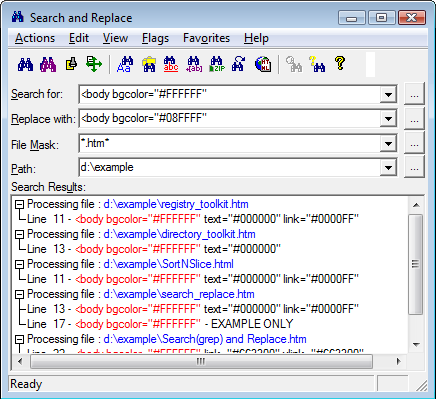
Screenshot taken from the Funduc website
There’s a shareware tool for that! Search and Replace by Funduc Software is a great little tool that can easily fix this problem. It “searches through one or more files files for a string and can also replace that ‘search hit’ with another string. It can even search for the string inside .ZIP files, which can be a handy feature to have. Search and Replace is also available in international versions. As they explain on the Funduc website, “Language interface downloads are available below for German, Danish, Dutch, French, Italian, Portuguese, and Spanish versions. Some older Japanese, Greek, Norwegian, and Swedish modules are also available.” You can also write support@funduc.com if you need an older language dll that is not listed. You simply install the English version and then add the language support files into the Search and Replace program directory.
This is a must-have tool for translators. I can’t tell you how many times I have relied on this tool. Search and Replace costs $25.00, Replace Studio Pro costs $30.00 and Replace Studio Business Edition costs $37.00. I have been perfectly happy with Search and Replace for years now. Windows XP, Windows 2003, Windows Vista, and Windows 7. 32-bit and x64 versions are available for all three tools.


