TGIF: Ohrwurm September 26, 2008
Posted by Jill (@bonnjill) in Fun stuff.3 comments
One of my favorite German words is Ohrwurm. An Ohrwurm (literally: earworm) is a portion of a song or other musical material that becomes “stuck” in a person’s head or repeats against one’s will within one’s mind. One of my favorite bloggers shared this little ditty with us the other day, and I cannot get it out of my head for the life of me. She prefaced it as being “the whitest thing [she’d] seen in years.” I apologize in advance for sharing this tune with you because you will not be able to get it out of your head, but it is just too funny to not share. There is some controversy as to whether this clip and this group are actually real. According to some folks, this group really did exist in the 1970s. Even if they didn’t, this is just good stuff!
If you enjoyed it, you might also enjoy the commentary here.
TGIF: Berlitz ad – Improve your language September 26, 2008
Posted by Jill (@bonnjill) in Fun stuff, German culture.2 comments
It’s hard to top the I Love Lucy clip, but I’m going to try. This commercial is an oldie but a goodie.
For those of you who don’t speak German, the senior officer is explaining the Coast Guard equipment to the newbie. What he is saying isn’t really that important, but it’s basically “This is my sector. This is the Coast Guard’s most important piece of equipment. This device. This device.” Then something unintelligible like life-saving/survival radar or something about survival – it’s hard to tell and neither choice makes much sense grammatically. The senior officer leaves him alone at his new post and hilarity ensues in English. Enjoy!
For those of you who are interested in the German:
“Das hier ist mein Sektor. Das hier ist das wichtigste Gerät des Küstenwächters. Das Gerät und das Gerät. Überlebensradar.” [but it could be Überlebensretter – it’s difficult to hear]
Payment practice groups for translators September 25, 2008
Posted by Jill (@bonnjill) in Business practices.add a comment
I got contacted yesterday by a local translation agency for an interpreting job, which I turned down because I don’t interpret. However, I also let them know that I couldn’t in good conscience recommend someone, because they had come to my attention several years ago on several payment practice listservs to which I belong. I could have insisted on payment up front, as Corinne at Thoughts on Translation advocates, but, like I said, I don’t interpret. I prefer to sit behind my computer and come up with the perfect word.
In honor of this, here is a list of payment practice groups that was compiled by Maja Reimers and posted on the PT listserv (a German language mailing list for translators – primarily Europe-based) Wednesday:
Favorite tools: ABBYY FineReader September 24, 2008
Posted by Jill (@bonnjill) in Business practices, Tools, Translation Sites.5 comments
It seems like 80% of my source texts are now in PDF format, so my all-time favorite tool is without a doubt ABBYY FineReader. To quote the ABBYY web site:
ABBYY FineReader® is an intelligent and easy-to-use OCR (Optical Character Recognition) and PDF conversion software that is the optimal alternative to manual data entry and typing. It is an ideal choice for professionals that want to save time and effort while producing excellent results. It provides powerful functionality for converting images received from a scanner, a digital camera or by fax, as well as PDF files, into editable and searchable formats. The program accurately retains formatting and layout of documents and supports a wide range of recognition languages and output file formats.
ABBYY FineReader is very intuitive to use and sometimes even replicates graphics and logos. Users can process documents in 184 languages, including Chinese, Japanese, Thai, Hebrew, Armenian, Cyrillic, Greek, and Latin. ABBYY FineReader also reads pre- and post-reform German orthography, Old German script, scripting languages, and simple chemical formulas. The text recognition software includes dictionaries with spell-checking capabilities for 38 languages allowing verification of recognized text directly in the FineReader Editor. Also, apparently FineReader 9.0 Professional Edition now automatically recognizes the document’s language, which saves you the step of manually selecting the appropriate document recognition language, as well as spreadsheets and tables.
 PDF Transformer is scaled-down version of ABBYY FineReader. It is also “a comprehensive PDF conversion and creation tool” that “accurately transforms PDF files into editable formats and creates searchable PDF documents from Microsoft Office applications.” PDF Transformer only costs $99.99 and does basically the same thing (PDF conversion and PDF creation).
One thing I really like about FineReader is that it does not create as many text boxes as, say, OmniPage. FineReader can convert PDFs as well as graphics (such as TIFs or the eFax attachments I receive) into Word files that can be processed with a translation memory tool. Its Check Spelling feature allows me to ensure that the words were recognized properly, and I can correct them before saving the file. I have also been known to do a “down and dirty” OCR without spellchecking just to get a quick and fairly accurate word count estimate with PractiCount (or AnyCount, Total Assistant or whichever counting tool you prefer). You can also play with the save options to find your ideal settings.
I sometimes have to clean up the file by hand, because it has problems with handwritten text and tables (and checkboxes, some bullet lists, etc.). I simply open a clean Word file and copy and paste the text into the new file using the Edit->Paste Special command, which removes all the formatting. I then format the text manually. This also ensures that the margins are consistent and not haphazard, which sometimes happens as well during the conversion. I also find that the program sometimes creates columns when a table would be much more convenient. Again, I simply create the table and then copy and paste the text into it.
Some translators I know feel that OCR and formatting should be the job of the agency or project manager and/or they should be paid extra for converting a file into Word. I disagree, but I am willing to accept alternate opinions in the comments below. 🙂 Some smaller agencies aren’t as savvy and don’t know how to use OCR programs. Converting the file also allows me to quickly translate it using my translation memory tool (although one client specifically does not want me to use Trados with its files for confidentiality reasons, which I respect). I also feel I have more control over the actual document I am going to work with if I actually do the conversion myself. I have seen too many files that were sloppily OCRed and not spellchecked, which then makes the text confusing and this could easily lead to a mistranslation. If I do get a file that has been run through an OCR program I always insist on getting the original as well so that I can compare the two files.
One very important tip I have is that if you are going to order it, try ordering it from a country other than the United States. I bought my copy off eBay.de. The prices displayed to people accessing the Abbyy website from the States differ drastically from the prices shown to people accessing the website from Europe. ABBYY FineReader 9.0 Professional is displayed to European visitors as costing EUR 139/GBP 89 for the download version, while a price of $399.99 is displayed to someone who lives in the States. I bought my version (FineReader 8.0) for €90 ($116) and received the original CD and a manual in the mail, but you can also order a digital version of the software.
Download the 30-day trials of ABBYY FineReader and PDF Transformer to see which one you prefer and shop around for the best price. You’ll find the tools quickly pay for themselves.
Someone’s wrong September 24, 2008
Posted by Jill (@bonnjill) in Fun stuff.4 comments
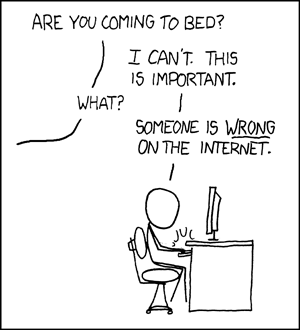
If you knew my friend Susanne, who sent this to me, you would *really* appreciate the humor of this comic strip. As it is, this reminded me of the old newsgroup days, but it can also apply to any translation or non-translation-related listservs you may be on.
SDL Trados training – total crock or benefit? September 23, 2008
Posted by Jill (@bonnjill) in Tools, Translation Sites.10 comments
If you are an ATA member you probably got an e-mail from SDL Trados today pushing its SDL Trados training at the ATA Conference in Orlando. Having conducted several independent (i.e., non-Trados-funded) training sessions for NOTA and ATA members and having taught the grad students at Kent State how to use WinAlign and Trados Workbench for several years, I certainly have a strong opinion on this. I am curious to hear what others think about these courses as well as “the SDL Trados Certification Program.”
I personally think it’s a total crock. You buy the software for an exorbitant price and then have to shell out $195 for the “Getting Started course” and $295 for the “Intermediate course.” Or you can book all 3 courses for the low, low price of $395! If you ask me, they should be training us how to use the software for free – or creating software that is intuitive and doesn’t require additional training in order to be proficient. I only know one person who is “SDL certified” – and she attended NOTA’s first training session before signing up for the first wave of SDL certification. She feels she benefited from it, so I didn’t have the heart to tell her what I truly thought about it. Until now…
Blog lunch at ATA conference September 23, 2008
Posted by Jill (@bonnjill) in Fun stuff.2 comments
Corinne from Thoughts on Translation and I were talking about possibly organizing a lunch at this year’s ATA conference for fellow bloggers and those of you who read our blogs. We were thinking lunch on Thursday, the first day of the conference, would be a good choice. If you are interested in joining us, either add a comment or send us an e-mail.
A beautiful fall morning in Amish country September 22, 2008
Posted by Jill (@bonnjill) in Random musings.8 comments
Today is the first day of autumn. I’m suffering from translator’s block at the moment, which is a post planned for another day, but I wanted to share my joy of a beautiful fall morning spent meeting a friend for breakfast in Geauga County’s Amish country. Without a doubt, the number one joy of being a freelance translator is the ability to schedule your time as you see fit. I met a friend from high school for breakfast this morning. We spent two hours chatting about our lives, our former classmates, and her kids and husband over our Amish breakfasts. It was fabulous, but not near as fabulous as the 30-minute drive through Amish country. That’s the beauty of where I live – thirty minutes from Amish country and twenty minutes from downtown Cleveland.
Autumn is without a doubt my favorite season. The crisp air, the breathtaking fall colors, the smell of bonfires, apple cider, high school football games… It was still quite foggy this morning as I set out for Middlefield, which was featured on Rachel Ray’s television show a couple weeks ago. Driving through the fog on the highway past LaDue Reservoir, which is breathtaking no matter what the weather is, was movie-backdrop gorgeous. The leaves are just starting to turn red and gold, and it was still a little chilly at 8:30 a.m. (it’s 70 degrees and sunny right now as I write this). The two-lane highway merged to one lane after crossing the reservoir, and I was soon driving past old farmhouses, front yard ponds, and orchards and road-side produce stands. As I got closer to Middlefield I kept my eyes peeled for horse-drawn buggies (someone crashed into one two days ago and killed a 7-year-old Amish boy and injured his three brothers in Ashtabula County). Driving past farmhouses with well-tended pastures and no electrical lines to mar the view always makes me smile and yearn for simpler times (but I would never want to give up my computer or running water!).
I got to Mary Yoder’s Amish Kitchen just in time, and we sat at a table by the window where we could watch the horse-drawn buggies go by. I will be full from the breakfast buffet almost all day. I crashed the grade behind ours’ 20th high school reunion last weekend and had a lot to share with her, but that isn’t an excuse. We always talk for at least two hours when we meet for breakfast there. I drove home with the windows down. On the way home I had to slow down to 20 mph to wait for a chance to pass the buggy in front of me. I also stopped at the road-side produce stand to buy some peaches and apples. It was a perfect fall morning in Amish country. Now if I could only motivate myself to start my big translation…
Do you Twitter? September 22, 2008
Posted by Jill (@bonnjill) in Business practices, Random musings, Tools.5 comments
I’m pretty new to the social networking arena, so I’m a little confused about what the benefits are and how I can make social networking work for me. It took me forever to join LinkedIn, but I certainly don’t use it for anything other than a place to post my resume and network with colleagues (but even that seems kind of lame – I get the impression that a lot of people there are simply trying to collect as many connections as possible instead of linking up with friends and good acquaintances). The one thing I really like about it is that I have been able to catch up with old friends and co-workers from Germany – and discovered that my friend and colleague in Seattle is good friends with one of my old Translingua co-workers. The world is getting really small…
I haven’t signed up for Facebook, MySpace or Friendster, because it seems too social – and, as we know, we translators are not big on the social skills. 🙂 But seriously, it’s a bit too much information for my taste. Sure, I have a blog and share bits and pieces of my life on it, but I don’t let it all hang out like some folks on Facebook do.
However, I think Twitter could be useful to a freelance translator if enough of our clients were also using it. Instead of sharing the mundane details of your life (as most people there do), you could post that you are translating a 19,000 word job this week and are unavailable for new projects. This could save project managers from skyping or calling me to see if I am available for their 6,000 word job this week. Or maybe I have misunderstood what Twitter is all about. So, if you use Twitter I would really appreciate it if you could share your experiences with me (us) and tell us how you use it.
There is going to be a presentation on social networking at the ATA conference in Orlando that I am really looking forward to attending (Social Networking: How to Practice One of the Most Effective Marketing Tools Today, Saturday from 4 to 5 PM), but I have no patience and want to know about Twitter now 🙂
GITS Blog: Seven things I love about being a freelance translator September 19, 2008
Posted by Jill (@bonnjill) in Business practices, Random musings, Translation Sites.3 comments
Hey folks, if you haven’t read Ryan’s post on The GITS Blog, Seven things I love about being a freelance translator, you should click to it right now. We get caught up in the cycle of complaining about clients and talking about how tough freelancing can be, but it’s important to also focus on the positive side of freelancing. There are a lot of benefits to freelancing, and I agree wholeheartedly with all seven of Ryan’s points. Now if you’ll excuse me, I’m going to go take advantage of point number three (“I can work from anywhere”) and go work at a local restaurant with several folks from my Coworking/Work at Home Meetup group. OK, it isn’t quite the point he was trying to make, but I do love the fact that I can truly work from anywhere. Plus, I can work for clients from all over the world out of a suburb of Cleveland, Ohio and enjoy a good standard of living (and buy a nice house for $150,000, which is impossible on the East and West coasts).


 Musings from an overworked translator