Favorite tools: ABBYY FineReader September 24, 2008
Posted by Jill (@bonnjill) in Business practices, Tools, Translation Sites.5 comments
It seems like 80% of my source texts are now in PDF format, so my all-time favorite tool is without a doubt ABBYY FineReader. To quote the ABBYY web site:
ABBYY FineReader® is an intelligent and easy-to-use OCR (Optical Character Recognition) and PDF conversion software that is the optimal alternative to manual data entry and typing. It is an ideal choice for professionals that want to save time and effort while producing excellent results. It provides powerful functionality for converting images received from a scanner, a digital camera or by fax, as well as PDF files, into editable and searchable formats. The program accurately retains formatting and layout of documents and supports a wide range of recognition languages and output file formats.
ABBYY FineReader is very intuitive to use and sometimes even replicates graphics and logos. Users can process documents in 184 languages, including Chinese, Japanese, Thai, Hebrew, Armenian, Cyrillic, Greek, and Latin. ABBYY FineReader also reads pre- and post-reform German orthography, Old German script, scripting languages, and simple chemical formulas. The text recognition software includes dictionaries with spell-checking capabilities for 38 languages allowing verification of recognized text directly in the FineReader Editor. Also, apparently FineReader 9.0 Professional Edition now automatically recognizes the document’s language, which saves you the step of manually selecting the appropriate document recognition language, as well as spreadsheets and tables.
 PDF Transformer is scaled-down version of ABBYY FineReader. It is also “a comprehensive PDF conversion and creation tool” that “accurately transforms PDF files into editable formats and creates searchable PDF documents from Microsoft Office applications.” PDF Transformer only costs $99.99 and does basically the same thing (PDF conversion and PDF creation).
One thing I really like about FineReader is that it does not create as many text boxes as, say, OmniPage. FineReader can convert PDFs as well as graphics (such as TIFs or the eFax attachments I receive) into Word files that can be processed with a translation memory tool. Its Check Spelling feature allows me to ensure that the words were recognized properly, and I can correct them before saving the file. I have also been known to do a “down and dirty” OCR without spellchecking just to get a quick and fairly accurate word count estimate with PractiCount (or AnyCount, Total Assistant or whichever counting tool you prefer). You can also play with the save options to find your ideal settings.
I sometimes have to clean up the file by hand, because it has problems with handwritten text and tables (and checkboxes, some bullet lists, etc.). I simply open a clean Word file and copy and paste the text into the new file using the Edit->Paste Special command, which removes all the formatting. I then format the text manually. This also ensures that the margins are consistent and not haphazard, which sometimes happens as well during the conversion. I also find that the program sometimes creates columns when a table would be much more convenient. Again, I simply create the table and then copy and paste the text into it.
Some translators I know feel that OCR and formatting should be the job of the agency or project manager and/or they should be paid extra for converting a file into Word. I disagree, but I am willing to accept alternate opinions in the comments below. 🙂 Some smaller agencies aren’t as savvy and don’t know how to use OCR programs. Converting the file also allows me to quickly translate it using my translation memory tool (although one client specifically does not want me to use Trados with its files for confidentiality reasons, which I respect). I also feel I have more control over the actual document I am going to work with if I actually do the conversion myself. I have seen too many files that were sloppily OCRed and not spellchecked, which then makes the text confusing and this could easily lead to a mistranslation. If I do get a file that has been run through an OCR program I always insist on getting the original as well so that I can compare the two files.
One very important tip I have is that if you are going to order it, try ordering it from a country other than the United States. I bought my copy off eBay.de. The prices displayed to people accessing the Abbyy website from the States differ drastically from the prices shown to people accessing the website from Europe. ABBYY FineReader 9.0 Professional is displayed to European visitors as costing EUR 139/GBP 89 for the download version, while a price of $399.99 is displayed to someone who lives in the States. I bought my version (FineReader 8.0) for €90 ($116) and received the original CD and a manual in the mail, but you can also order a digital version of the software.
Download the 30-day trials of ABBYY FineReader and PDF Transformer to see which one you prefer and shop around for the best price. You’ll find the tools quickly pay for themselves.
Do you Twitter? September 22, 2008
Posted by Jill (@bonnjill) in Business practices, Random musings, Tools.5 comments
I’m pretty new to the social networking arena, so I’m a little confused about what the benefits are and how I can make social networking work for me. It took me forever to join LinkedIn, but I certainly don’t use it for anything other than a place to post my resume and network with colleagues (but even that seems kind of lame – I get the impression that a lot of people there are simply trying to collect as many connections as possible instead of linking up with friends and good acquaintances). The one thing I really like about it is that I have been able to catch up with old friends and co-workers from Germany – and discovered that my friend and colleague in Seattle is good friends with one of my old Translingua co-workers. The world is getting really small…
I haven’t signed up for Facebook, MySpace or Friendster, because it seems too social – and, as we know, we translators are not big on the social skills. 🙂 But seriously, it’s a bit too much information for my taste. Sure, I have a blog and share bits and pieces of my life on it, but I don’t let it all hang out like some folks on Facebook do.
However, I think Twitter could be useful to a freelance translator if enough of our clients were also using it. Instead of sharing the mundane details of your life (as most people there do), you could post that you are translating a 19,000 word job this week and are unavailable for new projects. This could save project managers from skyping or calling me to see if I am available for their 6,000 word job this week. Or maybe I have misunderstood what Twitter is all about. So, if you use Twitter I would really appreciate it if you could share your experiences with me (us) and tell us how you use it.
There is going to be a presentation on social networking at the ATA conference in Orlando that I am really looking forward to attending (Social Networking: How to Practice One of the Most Effective Marketing Tools Today, Saturday from 4 to 5 PM), but I have no patience and want to know about Twitter now 🙂
GITS Blog: Seven things I love about being a freelance translator September 19, 2008
Posted by Jill (@bonnjill) in Business practices, Random musings, Translation Sites.3 comments
Hey folks, if you haven’t read Ryan’s post on The GITS Blog, Seven things I love about being a freelance translator, you should click to it right now. We get caught up in the cycle of complaining about clients and talking about how tough freelancing can be, but it’s important to also focus on the positive side of freelancing. There are a lot of benefits to freelancing, and I agree wholeheartedly with all seven of Ryan’s points. Now if you’ll excuse me, I’m going to go take advantage of point number three (“I can work from anywhere”) and go work at a local restaurant with several folks from my Coworking/Work at Home Meetup group. OK, it isn’t quite the point he was trying to make, but I do love the fact that I can truly work from anywhere. Plus, I can work for clients from all over the world out of a suburb of Cleveland, Ohio and enjoy a good standard of living (and buy a nice house for $150,000, which is impossible on the East and West coasts).
Top 10 rules for working from home September 17, 2008
Posted by Jill (@bonnjill) in Business practices, Random musings.10 comments
In these days of high gas prices and rising living expenses in general, telecommuting is a hot topic. Many people aspire to work from home, which offers you the freedom to tailor your hours around childcare and cut out unnecessary travel and clothing expenses, office distractions and the need to work 9-5. We translators are ahead of the game, so to speak. Here are my top 10 rules for working from home.
1. Set office hours and stick to them.
The beauty of working from home is you can work whenever it suits you, but it is easy to drift away and do other things – or just the opposite, work the whole day. Decide on a set schedule and stick with it. Keep a log if you have to. You might want to kick-start your day by taking a walk around the block or scheduling a shower at 9 a.m. and then getting to work.
2. Get dressed.
It is hard to feel efficient when talking to a potential customer in your pajamas. I’m not advocating wearing a blouse and a skirt or a suit and tie, but at least lose the pajamas. My favorite organizational guru, FlyLady, insists that you should always “get dressed to lace up shoes” when you first get up in the morning. This means fix your hair and face too. According to FlyLady, “you act different when you have clothes and shoes on.” As for why the shoes should be laced, “putting shoes on your feet that lace up are better than slip-ons or sandals, because they are harder to take off. Instead of kicking your shoes off for a quick snooze on the couch, you actually have to go to a bit more trouble.”
3. Avoid the television during your office hours.
I know this seems like a given, but I have heard from several colleagues who had trouble managing their time in the beginning because they were watching their soaps instead of sending out resumes to potential clients. It is so easy to get sucked into a television program and put off your work – especially if you do not have a looming deadline. Keep the TV off during your office hours or be very regimented about turning it off after a scheduled break. I love Law and Order marathons as much as the next person, but I don’t watch them if I have a looming deadline.
4. Create a separate office space.
Ideally this is a separate room, with a door you can shut at the end of your office hours. If you haven’t got enough space, think carefully about where you want to work. Keeping a computer in the corner of your bedroom is not a good idea. Bedrooms should be a place to unwind and relax – not have a constant reminder that you can quickly check your e-mail. If you have to, partition a space off in the living room or dining room with a screen.
4. Plan your day.
Make a to-do list and do things in order of importance. Keep up with your e-mail. Answer e-mail as soon as you can before it becomes overwhelming. Make the difficult calls when you are starting your day, because putting them off and dreading them can sap your energy all day.
5. Have a clutter-free desk.
Think of your desk as a place of action. At the end of each day, put everything away and update your job board. I love starting each day with a clear desk. Keep the minimum of essential items such as pens and a few stationery supplies on your desk. Try and work on one project at a time so you can keep focused.
6. Don’t let post-its clutter up your desk.
If you have too many post-its you will start ignoring them. Keep a notebook or log to record phone calls on rather than post-its and scraps of paper.
7. File stuff away as soon as you can.
Invest in a filing cabinet and personalize your filing system. Also, does it really need to be in alphabetical order? Why not file the items chronologically at the front of a folder? I have four files for each business year and file invoices, bank statements, pay stubs, bills, etc. in chronological order. More on this another day.
8. Turn off the lights and close the office door at the end of the day.
It is so easy to keep the computer on and check the e-mail before you go to bed. One of my colleagues does not answer her phone outside her business hours, which she clearly states on her answering machine message. It isn’t healthy to be accessible 24/7. Our customers don’t usually work 24/7, so they shouldn’t expect you to.
9. Communicate your boundaries with your customers.
If you get up at 5 a.m. so you are available to take your kids to school or are a night owl, let your customers know. My customers know I do not get in the office until 10 a.m. because I work best later in the day. I also avoid working with customers who don’t respect boundaries. Unless they have a valid reason for doing so and are in a life-and-death emergency situation, if an agency calls me at 3 a.m., 8 p.m. on a Friday night or even Sunday night (these examples have all happened to me at one time or another) I cross them off my mental list of customers. If the customer’s expectations are unrealistic tell them and explain why.
10. Be sure you get some “me time.”
Take weekends or a couple days during the week off. Schedule time to exercise. Get a monthly massage. Take a walk in the park a couple days a week. Down time is so important.
If you follow these 10 simple rules you will find working from home to be more enjoyable and rewarding than it would be otherwise. Give it a try and see for yourself. Did I miss something? Tell me in the comments!
New York Times: Secrets to good hard-drive hygiene September 17, 2008
Posted by Jill (@bonnjill) in Business practices.add a comment
I wrote about backup systems several days ago. While cleaning off my hard drive just now I stumbled on this New York Times article on consumer backup software, Secrets to Good Hard-Drive Hygiene, that I thought did a good job of illustrating the importance of backing up files and the various options available for backing up your data. It is from July 2005, but it is still relevant today. Corinne McKay also wrote a really good post, Methods for backing up your computer data, the same day I did before reading my post in her feed reader, which just goes to prove that brilliant minds think alike. 🙂
I looked into several of the suggestions made in the comments to Watch your back – what is YOUR back-up system and have decided to try Syncplicity. It seems like a trustworthy back-up system, and the idea of easily transferring files to a laptop appeals to me. I will test it in a few hours when I transfer files from my computer to my laptop in preparation for heading to my sister’s to babysit my niece on Thursday, who finally gets her half-body cast off on Friday. I transferred my files when I babysat her two weeks ago by burning them to a CD-RW and copying them to the laptop, but it helps to remember to bring the laptop’s power cord with you when you are going to work somewhere off-site… I had to use my brother-in-law’s laptop to finish and deliver my files. And I learned to hate Vista and Office 2007.
Watch your back – what is YOUR back-up system? September 15, 2008
Posted by Jill (@bonnjill) in Business practices, Random musings.9 comments
Cleveland got hit with the remnants of Ike yesterday. We had sustained winds of 40 mph and gusts of 50-60 mph for several hours, some rain, and lots of downed trees and power lines. The lights flickered a couple times here, so I decided to turn off my computer and settle in with a good book. Before I did, I e-mailed the translation I was working on to my Gmail account – just in case I needed to go somewhere else to access and work on it today, because it is due at EOB.
Luckily I didn’t lose power, but 336,000 people in the Cleveland area did. It got me to thinking about back-up systems. I used to back up on a zip drive back in Germany. Now I have an external hard drive. I have it set to automatically back up my files at midnight every night, because I usually have my computer on but am watching TV. Unfortunately it hasn’t worked in about a year. I tried to update the driver and reinstall it recently when I had some down time, but the thing is just an expensive paperweight at the moment. I need to buy a new one, and I think this week will finally be the time I do it.
It is also really important to keep a copy of your important files off-site in case of a power outage, flood, fire, etc. I know this and yet I rarely do it. Jost Zetzsche, who writes the biweekly newsletter for translators called The Tool Kit (if you don’t subscribe, I highly recommend you do – lots of good information about translation tools and other issues!), mentioned once that he stores his external hard drive in his car. As I said before, my off-site back-up system consists solely of me mailing files to my Gmail account. I used this more when I was teaching at Kent State and would e-mail the PowerPoint presentation and files I needed that day just in case my zip drive didn’t work. There are plenty of off-site file storage sites out there like RSync or Global Datavault (just to name the first two hits on Google), but there are so many it is hard to choose. Plus, most of them cater to big companies and not one-man operations. If you can recommend any that don’t cost an arm and a leg, I would love to hear about them!
Freelance rule no. 1: Never rely on one or two clients September 11, 2008
Posted by Jill (@bonnjill) in Business practices, Random musings, Translation Sites.1 comment so far
I mentioned in my post two days ago that I had gossiped/chatted with several colleagues that day. Well, one of them was telling me that one of my former clients had lost his government contract and dissolved his agency a while back. This morning I was chatting with another colleague who reminded me how lucky I had been by not accepting his offer of full-time employment with his agency. I had completely forgotten all about it, because I always get one or two offers of full-time employment at every ATA conference. My colleague’s comment was “I can see why you stress having many clients over just one….but then that’s life for most folks employed by one employer….”
I learned this lesson indirectly when I was working in Germany. The agency I worked for relied too much on Microsoft and got into some financial difficulties when Microsoft started paying later and later. Instead of shopping around for new clients the owner ended up selling the agency to a bigger agency, which in turn sold it to an even bigger agency. By then the agency I had worked for was unrecognizable. Luckily I had left before the owner sold the agency. By the second sale, many of my colleagues who still worked there were forced to either move almost 100 km away or find employment elsewhere.
Work with the agency from the first paragraph dried up a year or so ago, and now I know why. Having enough other clients, it really didn’t bother me, and I hadn’t given it another thought. I knew it wasn’t the quality of my work, because he had obviously been impressed enough to want to hire me. Working in-house simply isn’t for me. I love the freedom and excitement of freelancing too much. It isn’t for everyone, but it can be very rewarding if you are well-suited for it.
A good general rule of thumb is to have about 7 A and B clients (for a good explanation of what an A and B client is, see Some thoughts on setting goals at Thoughts on Translation). That way if one of your A or B clients starts paying late or gets bought by another, less-than-reputable agency it isn’t that much of a blow to your pocketbook. I also get regularly contacted by new agencies who found my listing on the ATA website or on ProZ.com. I consider them C and D clients and am always willing to give them a try if I have the time and the project is interesting or in one of my chosen fields. Because they could end up to be A or B clients who pay even better than existing clients.
The only constant in life is change. Freelancing is by and large always about constant change. Every day we get new and different texts to translate. Our client base should also be fluid and constantly changing and improving.
Electronic dictionaries vs. bound dictionaries September 10, 2008
Posted by Jill (@bonnjill) in Business practices, Tools, Translation Sites.3 comments
No sooner do you announce that you are slow, and the work comes pouring in… I am translating a couple surveys today and using both my electronic dictionary interfaces (Langenscheidt and UniLex) and Leo.org to look up words I’m unsure of or can’t immediately come up with. Working with electronic dictionaries and web-based glossaries and dictionaries sure have made our lives easier. Most of my 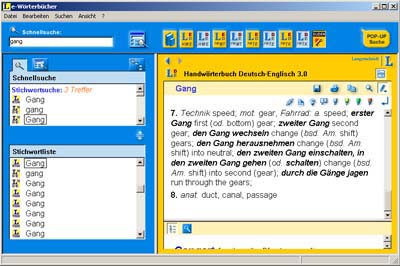 colleagues agree that they rarely reach for bound dictionaries anymore. It is so much quicker and easier to highlight a word and use a keyboard shortcut to paste it into an electronic dictionary interface.
Back when I still thought the ATA accreditation (now called ‘certification’) exam was worth taking I bought lots of bound dictionaries to bring with me to the exam. Now I rarely reach for a dictionary if I have it in electronic form or can easily look up a term on Google.
It is also so easy to work anywhere, because I can pop the translation on my laptop and use all my electronic dictionaries without having to schlepp my heavy dictionaries with me. That is one of the main reasons I stopped working for the FBI – having to drag all my dictionaries in with me (well, that and not being given access to the Internet). Now it isn’t a problem to head to a coffee shop or restaurant with WiFi or travel to Germany or my sister’s to babysit and not be at a disadvantage. I remember dragging dictionaries with me to several ATA conferences because I had some translations to finish before I could enjoy myself.
I love my Langenscheidt and UniLex interfaces. I have four dictionaries each installed on them and, after updating the UniLex and changing a setting under Options, am able to search all the dictionaries in the interface at once. My Langenscheidt dictionaries include the Handwörterbuch, Fachwörterbuch der Mikroelektronik, Fachwörterbuch Telekommunikation, and Peter Schmitt’s Fachwörterbuch der Technik und angewandte Wissenschaften (one of the best technical dictionaries out there). The UniLex interface allows me to quickly access to the Collins/Pons Unabridged German to English Dictionary, Ernst Wörterbuch der industriellen Technik (a good technical dictionary, which I also have in bound form), Brinkmann/Blaha Daten- und Kommunikationtechnik (Data Systems and Communication Technology) Dictionary, and Kucera Dictionary of Chemistry. I ordered the latest electronic version of the Großer Eichborn from UniLex yesterday. I am seriously considering buying the electronic version Dietl/Lorenz Dictionary of Legal, Commercial and Political Terms as well to make my life easier because it takes so long to pull the dictionary off the shelf next to me and find the word I need. Time is money and the more words you can translate an hour the more you earn!
If a term isn’t in any of the dictionaries in the one interface it is usually in the other. I also like to check both and compare all the suggestions in order to choose the most suitable one. I won’t entirely stop buying bound dictionaries, because a) some are still only available in hard copy and b) I am a dictionary addict and they look so great on the shelf. But if given the choice I will always choose the CD-ROM.
Things are kind of quiet on the home front September 9, 2008
Posted by Jill (@bonnjill) in Business practices, Random musings.1 comment so far
I’ve been enjoying a couple of slow days, and that is why I haven’t been posting much in the past couple of days (unlike Corinne who has been a blogging machine… 🙂 ). I got a small job this morning that I finished in about 15 minutes. I charged my minimum rate, so I did pretty well for 15 minutes’ work. I met a friend for lunch and treated myself afterward to a latte at the café down the street. I spent the rest of the day cleaning up my office, shredding some old documents, catching up on my e-mail, buying the new electronic version of Dietl/Lorenz Dictionary of Legal, Commercial and Political Terms, updating my LinkedIn profile, and reading Dead Until Dark by Charlaine Harris (the HBO series True Blood, which premiered Sunday night, is based on her Southern vampire/Sookie Stackhouse books, and I had forgotten who the murderer was so I decided to reread it). Her books are addicting and light reads that you simply can’t put down. I also gossiped/chatted with several colleagues about various things, so I know I’m not the only one having a slow week.
When you are a freelancer you have to take advantage of the lulls, because there isn’t usually a lot of down time. When things are a little slow you have the chance to install software updates you’ve downloaded but not gotten around to installing, organize and archive the files on your computer, import some glossaries into your Multiterm termbase, buy that dictionary you’ve been meaning to order, and finish those little things that have been languishing on the To Do list for a couple weeks. I use a To Do list on iGoogle to keep track of appointments I want to make, phone calls I need to return, and things I need/want to buy. It really helps me remember things. If tomorrow is slow I have a list of things I want to do, but if I don’t have the time it isn’t that big a deal. Because chances are I am going to wake up tomorrow morning and have three translation requests in my in box.
Show me the money – Part 2 September 4, 2008
Posted by Jill (@bonnjill) in Business practices.2 comments
Just in case you missed it, my post entitled “Show me the money” has generated quite a few hits and inspired several good posts on other blogs. Most notable is The Masked Translator’s post today on taxes, “Crappy paperwork and the ideal accounting software for translators.” MT makes a very good point that you “should count the number of hours [you are] putting into tax-related crap, multiply this by [your] hourly [rate], and if the amount was greater than what [you] would pay a CPA and/or bookkeepers to handle the stuff, [you] should switch over,” following it up with the very wise words: “…you should always farm out tasks you do not enjoy as a freelancer to keep your job as fun as possible.” Later on in the comments MT states that “No freelancer should be doing business if not incorporated as an S Corporation or a single-member LLC.”
Yeah, I know. I just haven’t gotten around to incorporating… and if I am doing my job correctly I should not get sued. I think errors and omissions insurance is a waste of money for that very reason. There has only been one documented case of a translator being sued for an error, and a good proofreader would have caught the mistake. I have most of my work proofread by a colleague before delivering it to my client (and I do the same for her). But I digress… I want to focus on taxes. E&O insurance is another post for another day.
I do most of my bookkeeping myself, but hire a CPA to do my taxes. It may sound weird, but I actually enjoy doing the bookkeeping. Being the daughter of an accountant I keep meticulous records, and it only takes me about an hour to prepare my stuff for the CPA. However, it is important that you understand the tax system so that you can check and verify the CPA’s work. My CPA screwed up last year and added $4,000 of capital gains from someone else to my income. Luckily I caught it, and he had to fix it a couple days before Tax Day. It saved me from having to pay several hundred dollars. Instead I got a small refund.
I’m not saying everyone should adopt my system, but for those of you just starting out or looking for a quick system this is how I handle my bookkeeping. I use an Excel spreadsheet for my invoices (one spreadsheet for each tax quarter – 2008-1, 2008-2, etc.) and copy or write the job info with all the pertinent information (PO number, file info, word rate, etc.) on the worksheet as soon as I accept the job. I copy and paste worksheets from previous jobs for the same client so that I can ensure all the information is included and is consistent. Once the job is finished I enter the final word count, copy the worksheet into a new Excel spreadsheet, delete the extra worksheets, save the file (invoice_jsommer_2008-123.xls) and then convert it to a PDF (invoice_jsommer_2008-123.pdf), which I then send to the accounting department’s or project manager’s e-mail address (I have my client’s specified e-mail addresses saved in my e-mail address book with the alias “invoice@clientsname.com”). As soon as I send the invoice I then enter it into MS Money as a new deposit and specify the due date. I also put a little x in the top left-hand corner of my ongoing quarterly Excel spreadsheet indicating I have submitted the invoice. It sounds more confusing than it is.
In addition to an Excel spreadsheet for my invoices, I maintain a separate Excel spreadsheet for my quarterly income (one worksheet per quarter) that I use to track payments as they come in (if they are in euro I convert them according to that day’s exchange rate and enter the total in the dollar column) and automatically add the dollar column up for a quarterly total. I take the grand total for the quarter and multiply it by 20% for my quarterly estimated tax payment [=SUM(C42*0.2)]. I usually don’t owe any taxes this way and have gotten small refunds the past two years (just the way you want it – why give the government a non-interest-bearing loan when you can keep it in the bank for yourself?). In late February/early March I print out the four “quarterly income” Excel worksheets and my Tax Report from MS Money and pop the MS Money back-up file onto a memory stick for my CPA.
I have gotten to the point where I am considering becoming an LLC and hiring a company to do all this for me though. I just need to find the time to actually do it…
And special thanks to Sarah Dillon for her post “Making sure you get paid: part II.” It’s nice to hear my ramblings helped inspire someone to change their system. That made it all worthwhile!


 Musings from an overworked translator