Organization is key – part 2 October 2, 2008
Posted by Jill (@bonnjill) in Business practices.add a comment
I talked about keeping your workspace clean and organized earlier this week. Now it’s time to talk about electronic clutter. It is important to have a clean and organized workspace, but it is even more important (if not crucial) to keep your computer organized. If you aren’t organized you won’t be able to find your files quickly, which can lead to a lot of frustration. It is so important to have a well thought out system for your files and to keep your previous translations archived and TMs (translation memories) together in a central location so that you can quickly locate them if needed.
I keep all my active translation files in My Documents and try to be vigilant about moving files from my e-mail program’s Attachment folder to My Documents when I start to work on a job. Once I am finished with the jobs and have sent the invoice, I zip all the files for that job (source, target, Trados .bak file, client’s purchase order, and any reference material) to my Archive folder with the client’s name and one or two key words that best describe the project in case I need to open it later. For example, the two surveys on motor oil I translated last week are saved as client_oil.zip and client_oil2.zip. I then delete the files from My Documents.
I have lots of subfolders in My Documents to store files that I may want or need to access again, such as Finances, My Webs, NOTA, Terminology (glossaries I haven’t yet imported into MultiTerm), and Translation Background (which is filled with client non-disclosure agreements and reference material I will most likely use again). I also have a folder called “Temporary” under My Documents that I use for big jobs with lots of individual files. I vigilantly keep that cleaned out once the job is finished.
I’m not saying everyone should use my system, but it works for me. You should at least have a system that you have thought through that works for you.
In addition to changing the way we find and filter information, the Internet has changed the way we file. Ronni Eisenberg and Kate Kelly, in their book, Organize Your Home Office!, explain that you don’t need to keep as much as we used to because so much is available electronically. “You still need to create a file system, and you still need to keep up with it, but today’s technology is going to let you toss more than ever before,” Eisenberg and Kelly write, “Because new and better information is constantly accessible to us via the Internet, there’s less need to maintain all types of files.”
And I haven’t even started about my electronic calendar on Google, which ensures I don’t forget errands or appointments and get there on time, or my PalmPilot interface, which allows me to keep track of contact information, ToDos, notes, and appointments. I love the Google Calendar, because I can pull it up on any computer that has Internet access. I have been trying to use GooSync, which supposedly syncs the Google Calendar and a PalmPilot, but I can’t seem to get it to work. If anyone can offer any insight or suggest another tool that does this I would be most appreciative!!!
The freelancing problem no one talks about October 2, 2008
Posted by Jill (@bonnjill) in Random musings.3 comments
If you subscribe to this blog on a feed reader you probably noticed that my TGIF post disappeared. That’s because I am suffering from the freelancing problem no one ever talks about – losing all track of time and having no idea what day of the week it is :-). For some reason, today felt like a Friday to me, and I posted the TGIF video I planned to post tomorrow. I realized my error a little later and deleted it, but it probably already went out to the feed readers. Sorry about that.
The Urban Muse, a great blog about writing if you aren’t familiar with it, suggested a couple weeks ago that bloggers “keep a few posts in your drafts folder.” This was one of those “aha” moments for me, and I have had a couple posts percolating as drafts ever since. Unfortunately it is also too easy to simply click on Publish before you’ve had your morning cup of coffee. I jumped the gun this morning, since I am having a slow week and lost all track of time.
This is a frequent problem, because many of us work on the weekends and either take days off during the week or never take a day off (but that really isn’t healthy). A calendar usually keeps me in line, but everyone makes mistakes.
Actually, this was a good thing in this case. I dread Fridays, because that is the day that every agency I have ever worked with – and some I haven’t ever heard of – call in the late morning/early afternoon/evening with a job that simply must be finished by Monday. Lucky for me, I now have another day before that happens. It feels like Christmas! 🙂
Oktoberfest die Zweite (part 2) October 2, 2008
Posted by Jill (@bonnjill) in Uncategorized.add a comment
I attended a German Oktoberfest cooking class last night at Viking Cooking School. It was a hands-on cooking class, and we made soft pretzels (enjoyed with a spicy Obatzda cheese spread) , wild mushroom and spinach strudel (which was AMAZING – phyllo dough isn’t as difficult to work with as I thought…), grilled bratwursts with caramelized onions, and Black Forest cupcakes. After we finished cooking we enjoyed the fruits of our labor with a nice glass of wine. I’m still full this morning!
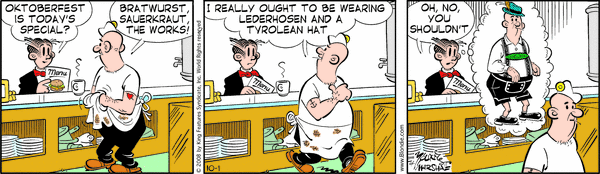
It seems the Americans are embracing the Oktoberfest more and more every year. In addition to numerous local Oktoberfests, there are features in the cooking sections of magazines and newspapers and lots of other cultural references to the big beer fest. Here is Blondie’s contribution to the Oktoberfest:
Confessions from an Internet junkie October 1, 2008
Posted by Jill (@bonnjill) in Random musings.1 comment so far
My name is Jill, and I’m an Internet addict.
I’ve been without Internet access since 7 PM last night (it’s shortly after noon as I write this). My ISP sent out a technician first thing this morning. He switched out my cable modem, the splitter both inside and outside my apartment, and the cable itself. After he left I was unable to access the Internet, but it took about an hour to work through all the other issues on the phone with Tech Support before I was finally able to get back online. It turns out the new cable modem caused my router to revolt, and this locked me in “quarantine.” The ISP page in the browser told me I needed to activate my service, but I’ve been a customer for five years now. Turns out my router needed to be rebooted for me to get online. But, hey, Skype still worked just fine the whole time, because Corinne tried to call me about our ATA presentation in the middle of all that.
Luckily I didn’t have any jobs due or anything to work on, because I had taken yesterday off to compensate for working over the weekend. I was fine about not having Internet last night (I caught up on some downloaded TV shows and read a book), but I was going through some serious withdrawal symptoms by this morning (or maybe it was just frustration at Tech Support’s complete ineptitude – it took until Level 3 to figure out the problem):
- Feeling of jumpiness or nervousness
- Anxiety
- Irritability or easily excited
- Emotional volatility, rapid emotional changes
- Depression
- Difficulty with thinking clearly
- Clammy skin
Wow, this isn’t a good feeling. I think I need to wean myself off the Internet a bit. It isn’t healthy. According to the site linked about, “Due to the nature of Internet Addiction Disorder (failed impulse control without involving an intoxicant), of all other addictions, IAD is said to be closest to pathological gambling.” Luckily my addiction doesn’t cost me a lot of money and hasn’t disrupted my “academic, social, financial, and occupational life the same way other well-documented addictions like pathological gambling, eating disorders, and alcoholism can.” In fact, the opposite is true. I truly feel the Internet benefits me in a wide variety of ways, but weaning myself off it a bit certainly isn’t a bad idea…
They say admitting you have a problem is the first step, but at least I can take comfort in the fact that I’m not alone.
Happy St. Jerome Day! September 30, 2008
Posted by Jill (@bonnjill) in Fun stuff, Translation Sites.2 comments
 Translators and interpreters celebrate September 30th as their day, since it is the Feast Day of the patron saint of librarians, scripture scholars, students, and of course, translators and interpreters. Eusebius Hieronymus Sophronius, better known today as Saint Jerome, was born sometime between 340 and 347 AD in Stridon, which is located on the Italian side of the modern Italian-Croatian border. He studied theology in Trier, which is one of my favorite German cities.
St. Jerome is one of the few people awarded sainthood in recognition of services rendered to the Church rather than for eminent sanctity or miracles. St. Jerome earned his place in history mainly for his translations and revisions of the Bible. He revised translations of the Gospels and the Psalms and translated the Old and New Testaments into Latin. This translation was recognized eleven centuries later by the Council of Trent as the official version of the Bible: the Vulgate.
Jerome’s humility regarding his own work set a good example for translators who followed him. He freely admitted ignorance, even embarrassment, when warranted, and revisited some of his translations, making corrections and additions. On the other hand, he also pointed out that a translation’s accuracy depended greatly on the reliability of the source text: copyists often inadvertently introduced errors, which would be compounded and passed down through the centuries.
Perhaps his most famous mistranslation put horns on Moses’s head. The original Hebrew scripture (Exodus 34) stated that when Moses descended from Mt. Sinai, he had “rays of light” coming from his head. The Hebrew word can also mean “horns,” and Jerome chose the latter meaning. This error has been perpetuated to the present in many ways. When Michelangelo sculpted a marble Moses in 1515, he relied on Jerome’s description in the Latin Vulgate translation. The resulting 235-cm-high horned statue can be seen in Rome (S. Pietro in Vincoli) today.
St. Jerome is usually depicted as a half-clad anchorite, with cross, skull and Bible for the only furniture of his cell, his red hat or some other indication of his rank somewhere in the picture. He is also often depicted with a lion, due to a medieval story in which he removed a thorn from a lion’s paw, and, less often, an owl, the symbol of wisdom and scholarship. Writing materials and the trumpet of final judgment are also part of his iconography.
St. Jerome died at Bethlehem from a long illness on September 30, 420. He is buried at St. Mary Major in Rome.
* This post was cobbled together from The Translator Interpreter Hall of Fame, Wikipedia, and here. For some fun with St. Jerome, see Sue Ellen Wright and Jost Zetzsche’s Jeromobot videos. We’ve also heard rumors that Jeromobot will be at this year’s ATA conference.
Pearls Before Swine on earworms September 29, 2008
Posted by Jill (@bonnjill) in Fun stuff.add a comment
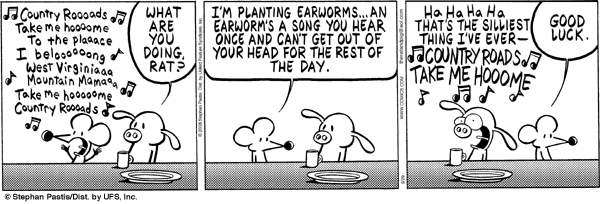
If I didn’t know that cartoons are written days – if not weeks – ahead of time I would think the Pearls Before Swine cartoonist read my blog 🙂
Dear Abby on reading September 29, 2008
Posted by Jill (@bonnjill) in Random musings.1 comment so far
I love reading – always have, always will. My family used to make fun of me, because my nose was always stuck in a book – especially on vacation. Reading expanded my vocabulary and put me in the Advanced English classes in high school. My love of books and reading – and research – have made me a better translator, so I was really happy to see today’s Dear Abby column. Most of the translators I know are also big readers, so I’m confident you will all enjoy this.
DEAR ABBY: I wrote your mother back in 1985, asking her to encourage my eighth-grade students to establish the wonderful habit of reading. My letter was published in The Portland Oregonian.
I still teach eighth-graders, but now I do it in California. It has been 23 years since your mother wrote my students about the importance of reading.
Today we have computers, text messaging and cell phones. It’s a different world now, but reading is still important. Would you write a couple of paragraphs about the joys of reading in your column? Your advice will be heeded by my students and many other students in the country who read your column. Kids relate to celebrities, and you are definitely famous. Thank you for your help. — RAY SMYTHE, PALM SPRINGS, CALIF.
DEAR RAY AND DEAR STUDENTS: I’m glad to oblige. For anyone who doesn’t already know, books are magic! Crack open a book and you will be instantly transported into the past, propelled into the future — or if you choose — escape into a world of fantasy. The options are endless.
But while history, science fiction, mysteries and romance provide a wealth of diversion, reading provides far more than just an escape. The greatest ideas of our most gifted thinkers lie between the covers of books waiting for you to discover them. And don’t be put off if the books are labeled “classics.” That word means only that they have been enjoyed by every single generation who has read them.
Reading is also a vital skill. Perusing a newspaper or doing research online, in addition to expanding your mind, can also be your transport to a successful future. And there is no more effective way to learn to write than by reading.
P.S. If this skill does not come easily for you, remember that libraries offer classes in literacy. There is no shame in needing extra help in learning to read, regardless of your age. The only shame is in not admitting it so you can get the help you need.
Organization is key – part 1 September 29, 2008
Posted by Jill (@bonnjill) in Business practices.1 comment so far
I think one of the most important skills for a translator besides the ability to comprehend the source text and accurately convey it in the target language is organization. Organization can drastically reduce your stress level and keep you on top of things. It is important to keep your workspace, your finances, your schedule, and your computer organized and clutter-free. Dorothee Racette has a fantastic presentation from the 2006 ATA conference on Organizational skills for a successful freelancer business that is an absolute must-read for every translator.
There are simple rules for keeping a clutter-free workspace. The most important ones revolve around getting control of your paper. To file effectively and quickly, you need to have the essentials: plenty of file folders, labels, file cabinets or cardboard or plastic boxes, bins, crates or carts. And don’t forget wastebaskets and recycling bins for the items that you choose not to file.
1) Have a system for your active filing. I use four hanging file folders that I file all my important documents in. They are labeled Business expenses, Bills, Bank statements, and Pay stubs for each year. At the end of the year I start four new hanging folders and archive the previous year’s files in an attractive wicker box. Since you need to keep tax-related information for seven years, I shred everything from seven years ago to make room for the new year.
2) Create a record retention policy. Despite technological advances, there are certain files, such as tax-related records and signed non-disclosure agreements, that you’ll need to keep for an extended period of time, or possibly forever. Most of your files can either be thrown away immediately or kept for a defined period of time, then discarded. To manage this process, you’ll need a record retention plan. The following simple file management guidelines are outlined by Barbara Hemphill in her book, Taming the Office Tiger:
- Keep indefinitely: annual financial statements, corporate documents (including non-disclosure agreements, minutes of board of directors’ meetings (if you are an LLC or S-Corp), etc.), and income tax paperwork and payment checks.
- Keep for 6 years: bank statements, voided checks, purchase records (purchase orders, payment vouchers, vendor invoices), and records (invoices, monthly statements, shipping papers and customers’ purchase orders).
- Keep for 4 years: personnel and payroll records (if you are an LLC or S-Corp).
- Keep for 3 years: monthly financial statements.
3) Manage your “to read” pile. You should make a plan to discard the paper as soon as you receive it. If you set it aside to read later, you most likely won’t. I’ve seen suggestions to put these non–urgent “to read” items in large file folder. I use a stacking In, Out, and To Read system. When the folder or bin gets too full, you need to go through it and weed out the items that are no longer relevant or interesting. I don’t let my mail pile up either. I go through it as soon as I receive it and throw all the junk mail in the recycling bin in the hallway.
4) Don’t print it out if you don’t have to. You can’t blame all of your clutter on mail, unfortunately. With so much information at our fingertips as we surf the Web, it can be tempting to print every interesting thing we find. There is no need. It most likely isn’t going anywhere. I know people who print out e-mails (heck, back in 1995 I *was* one of them). There is no reason for this! The only thing I print out now are travel confirmations and invoices. Everything else either gets stored on the computer or can be easily found again using Google.
5) Do you have business cards strewn across your desk or don’t know what to do with the cards when you receive them? I have my business cards filed in a business card folder. I also regularly go through the business card folder and throw out business cards that are outdated. If you have a lot of business cards, consider buying a business card scanner to keep electronic copies of the cards, which can later be searched by name or keyword.
6) Scan the original and throw it out. If you have documents that you need to keep, but you don’t use everyday or don’t have the room to store, use a scanner to create an electronic copy on your hard drive or disk. Also, a shredder is your friend. Run anything confidential or sensitive through a shredder before it hits the recycle bin.
7) Once your office is organized, you’ll want to keep it that way. One web site suggests treating your office as if it were your kitchen. A major part of maintaining order is the way you approach the task. To prevent future paper accumulation, treat the paper in your office as if it’s perishable. Don’t pile it up, telling yourself that you’ll deal with it when you have time. You wouldn’t do that with food in your kitchen. Make decisions on the paper immediately. Keep a recycle bin and a wastebasket next to your desk and use them frequently. Keep filtering, filing, and tossing and you’ll keep enjoying a clutter–free environment.
TGIF: Ohrwurm September 26, 2008
Posted by Jill (@bonnjill) in Fun stuff.3 comments
One of my favorite German words is Ohrwurm. An Ohrwurm (literally: earworm) is a portion of a song or other musical material that becomes “stuck” in a person’s head or repeats against one’s will within one’s mind. One of my favorite bloggers shared this little ditty with us the other day, and I cannot get it out of my head for the life of me. She prefaced it as being “the whitest thing [she’d] seen in years.” I apologize in advance for sharing this tune with you because you will not be able to get it out of your head, but it is just too funny to not share. There is some controversy as to whether this clip and this group are actually real. According to some folks, this group really did exist in the 1970s. Even if they didn’t, this is just good stuff!
If you enjoyed it, you might also enjoy the commentary here.
TGIF: Berlitz ad – Improve your language September 26, 2008
Posted by Jill (@bonnjill) in Fun stuff, German culture.2 comments
It’s hard to top the I Love Lucy clip, but I’m going to try. This commercial is an oldie but a goodie.
For those of you who don’t speak German, the senior officer is explaining the Coast Guard equipment to the newbie. What he is saying isn’t really that important, but it’s basically “This is my sector. This is the Coast Guard’s most important piece of equipment. This device. This device.” Then something unintelligible like life-saving/survival radar or something about survival – it’s hard to tell and neither choice makes much sense grammatically. The senior officer leaves him alone at his new post and hilarity ensues in English. Enjoy!
For those of you who are interested in the German:
“Das hier ist mein Sektor. Das hier ist das wichtigste Gerät des Küstenwächters. Das Gerät und das Gerät. Überlebensradar.” [but it could be Überlebensretter – it’s difficult to hear]


