Fall is Coming (In Memorium: Berta Kirchhoff) October 8, 2008
Posted by Jill (@bonnjill) in Random musings.1 comment so far
One of NOTA’s founding members died a month ago today. She was a Spanish translator and teacher as well as a poet. She left behind a grieving husband and two grieving sons. In honor of her passing, I would like to share her poem ‘Fall is Coming,’ which was read at her funeral and printed along with three other poems as a handout. She was a really sweet woman and always tried to attend our events despite her failing health. She had recently written to tell me she was retiring from the group to devote her time to her family. Berta, you will be missed.

- Photo from the Wikipedia Commons
Fall is Coming
Early this morning while walking to church
I found myself stepping
like a child on the few dry
leaves on the ground and making them crack.
Of all seasons fall is my favorite;
the sky is the bluest,
the air the clearest,
and the clouds have
not a silver but a gold lining.
The acorns are falling
on my neighbor’s roof
I can hear in the early morning
the singing of the birds, the chickadee calling
her mate for breakfast,
the tapping of the woodpeckers,
and the rispid cry of some big black birds.
The trees are changing, it will be an early Indian
summer, say the experts.
I don’t know if it was El Niño or La Niña
or the Holy Family, but one thing I know for sure is that
fall is coming.
This is a politics-free zone, but… October 7, 2008
Posted by Jill (@bonnjill) in Random musings.add a comment
I received this link to MatchOMatic from a friend today, and I think it might be very helpful while deciding who to vote for in the upcoming election. I know I found it to be very helpful and it reinforced my choice, but you could also surprise yourself!
New Gmail feature prevents drunk e-mailing October 7, 2008
Posted by Jill (@bonnjill) in Random musings, Tools.add a comment
Google released a useful new Gmail feature yesterday in its labs, which could help prevent intoxicated people from sending embarrassing late-night e-mails they might regret in the morning. When activated, the program will force a user to solve a series of math problems before allowing any message to be sent.
My question is, what if you are a total math loser and became a translator to avoid math 😉 ? Too bad they didn’t invent a feature that recognized and automatically fixed terrible typing. I think that would be more useful – and effective – than doing math problems, and it would be welcomed by terrible typists or those of us whose fingers get away from us. And it wouldn’t have to just be limited to weekend nights, which is the default setting – although you can change the settings. Back when I was in college (eight million years ago) Thursday was the big night out…
Thoughts on the ProZ.com Certified PRO network? October 7, 2008
Posted by Jill (@bonnjill) in Business practices, Random musings, Translation Sites.9 comments
I received the ProZ.com September newsletter this morning announcing something called “the ProZ.com Certified PRO network.”
A new ProZ.com program was announced on International Translation Day last week: the ProZ.com Certified PRO network.
This initiative is intended to provide qualified translators and translation companies with an opportunity to network and collaborate in an environment consisting entirely of screened professionals.
The impetus for the program came from member responses to the July survey on professional differentiation. The concept has been further refined and developed over the past several months by a private group consisting of ProZ.com members and site staff.
An overview was first made available last week. The program is being made open for applications starting today.
To learn more, go to: http://www.proz.com/pro-tag/info
Basically, those accepted into the program earn the “ProZ.com Certified PRO” title and seal, which may optionally be displayed in profile pages and elsewhere on or off the ProZ.com website. I am amazed that it took them this long to realize that most people were unhappy about “professional differentiation.” I’ve been railing about it for years! I’m curious to hear your thoughts on whether or not this is a positive step in the right direction. I’m also looking forward to hearing more about it at the ATA conference. If they can explain how they will accurately determine competence in the source and target languages, research competence, cultural competence, and technical competence as well as business reliability and good citizenship, I may just cave and actually join ProZ. But they will really have to sell it. I’m already overworked without ProZ’s help.
From their site:
Paid membership in ProZ.com (corporate membership for companies, regular membership for freelancers) is required; beyond that, there is no additional charge for participation in the program. Freelancers and companies must endorse the site’s professional guidelines and accept the terms and conditions of program participation to be certified.
If all it is is another title for paid membership, then thanks but no thanks.
Is Germany really that child-unfriendly? October 6, 2008
Posted by Jill (@bonnjill) in German culture, Random musings, Translation Sites.add a comment
One of my favorite German/English blogs, False Friends, has a post today about a “baby shooting” that made me chuckle. He likes to point out English misuse in German society. His dry comment “Zugegeben, Deutschland ist nicht besonders child-friendly, aber das geht echt etwas zu weit.” (Admittedly, Germany isn’t exactly child-friendly, but this really goes a little too far) had me laughing this morning. I’m just glad I wasn’t drinking my coffee yet. It would have ended up on my computer monitor. It wouldn’t have been the first time…
Advice for work-at-home apartment dwellers October 6, 2008
Posted by Jill (@bonnjill) in Business practices, Random musings.1 comment so far
The Cleveland Plain Dealer published an article by Robert Sberna last week in its Rentals/Classified section that was extremely informative for those of us who live in apartments and work from home – and perhaps those of you who do not. It discusses the importance of compartmentalizing living and work areas and how to handle distractions, which are two very important topics for any home-based worker. For expediency, I am going to paste it here in its entirety with contact information for the author, but kudos to the Plain Dealer for publishing it!
Advice for work-at-home apartment dwellers
By Robert Sberna
Tuesday, September 23, 2008Compartmentalizing living and work areas can improve productivity and efficiency
Not so many years ago, working from home was a benefit enjoyed mainly by those in entrepreneurial vocations such as freelance writing.
But today, home-based work opportunities, both full- and part-time, are open to a wide range of occupations. And the number of people working at home is expected to increase, driven by advances in digital technology, rising gas prices, and family-centered lifestyle choices.
If your apartment is currently doubling as your place of business, you’re aware of the conveniences and freedoms it offers. However, the most successful home-based workers understand that compartmentalizing their living area from their workspace is vital for productivity and time-management.
“By keeping the two spaces separate, it’s much easier to stay organized and uncluttered,” said JoEllen Salkin, a Solon-based professional organizer. “Compartmentalizing helps you to be the most efficient worker you can be. You can find documents and materials quickly, rather than wasting valuable work time looking for items.”
Ideally, a home office should be located in a dedicated space such as a spare bedroom, Salkin explained, noting that the use of a separate room offers privacy and makes it easier to take advantage of the home office tax deduction. For those who live in one-bedroom apartments however, space may be limited. In this case, a work area can be carved out of the living room by using furniture or even a decorative screen.
“There’s also a psychological reason for compartmentalizing,” said Salkin, who serves as president of the National Association of Professional Organizers’ North Coast Ohio chapter. “It all ties into keeping your business life separate from your home life. By separating your office area, you know when you’re at work. But when it’s time to stop working, you want to have the feeling that you’re leaving the office.”
Along with keeping your living and working spaces separate, Salkin said it’s important not to mingle your personal and business paperwork.
“For confidentiality reasons, you want to make sure that you keep client files in their own area,” she noted. “We also recommend investing in a fire-proof safe for storage of important documents.”
Check lease for any restrictions
Before launching a home-based business in your apartment, you’ll want to read your lease carefully. Rental agreements typically forbid tenants from using their apartments for any type of professional endeavor. However, many property managers won’t object to tenants working from their rental units as long as their business isn’t disruptive to their neighbors. To that end, it wouldn’t be a good idea to have a steady flow of clients visiting your apartment. And you don’t want to engage in an activity that involves loud noises or strong smells.
If you do plan on having the occasional client visit, professional organizer Muffy Kaesberg said you’ll want to keep your apartment clean and uncluttered.
“It’s very easy to get a small place messy in a short time, so you want to stay organized,” noted Kaesberg, a Cleveland Heights resident who co-owns Organizing 4 U. “Just remember that the client is forming an impression of you by the condition of your apartment. If you can’t keep your place neat and tidy, arrange to meet your clients in a coffee shop or restaurant.”
How to handle distractions
Those of us who work from home know that the television, Internet and refrigerator can be major distractions.
“If you’re having trouble managing your work time, use a timer to stay on track. Set the timer for a certain period, and when you finish, give yourself a reward of surfing the Internet for 15 minutes or getting a snack from the refrigerator. Or maybe you can check your e-mail. But it’s important that you finish your block of work before taking a break,” said Kaesberg.
Robert Sberna is a freelance writer who specializes in the real estate and finance sectors. He can be contacted at rchas@aol.com.
I’ve added an abbreviations glossary October 5, 2008
Posted by Jill (@bonnjill) in Random musings, Translation Sites.add a comment
Back in May when I started writing this blog I used some abbreviations that I assumed everyone understood, and that wasn’t the case. I have tried very hard to not use abbreviations in my posts so that I can address everyone – seasoned translators as well as those of you just breaking into the industry. I can’t guarantee I won’t forget that some people might not understand, so I have decided to add a glossary of abbreviations for readers to refer to if I use “T&I speak” (not to be confused with T&A speak, which I can assure you I will never use here or in real life). So if you see an abbreviation that stumps you, please let me know so that I can add it to the glossary. The glossary can be accessed at the top right-hand corner of the site.
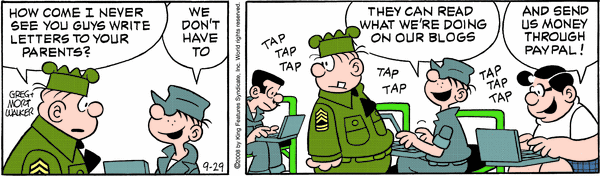
How technology has changed things October 5, 2008
Posted by Jill (@bonnjill) in Fun stuff.add a comment
Beetle Bailey appears to be super-hip. Hi Mom, there’s no need to send me money through PayPal though…
TGIF: Fun with languages on Frasier October 2, 2008
Posted by Jill (@bonnjill) in Fun stuff.2 comments
I was telling a friend about the I Love Lucy clip the other day. She told me about this scene in Frasier, which I had completely forgotten about. It’s from “An Affair To Forget.” Niles thinks Maris is having an affair with her fencing teacher. The trouble is, he only speaks German, so Niles needs Marta the maid to translate it into Spanish so Frasier can translate it into English for him.
It leads to a fencing duel.
Organization is key – part 2 October 2, 2008
Posted by Jill (@bonnjill) in Business practices.add a comment
I talked about keeping your workspace clean and organized earlier this week. Now it’s time to talk about electronic clutter. It is important to have a clean and organized workspace, but it is even more important (if not crucial) to keep your computer organized. If you aren’t organized you won’t be able to find your files quickly, which can lead to a lot of frustration. It is so important to have a well thought out system for your files and to keep your previous translations archived and TMs (translation memories) together in a central location so that you can quickly locate them if needed.
I keep all my active translation files in My Documents and try to be vigilant about moving files from my e-mail program’s Attachment folder to My Documents when I start to work on a job. Once I am finished with the jobs and have sent the invoice, I zip all the files for that job (source, target, Trados .bak file, client’s purchase order, and any reference material) to my Archive folder with the client’s name and one or two key words that best describe the project in case I need to open it later. For example, the two surveys on motor oil I translated last week are saved as client_oil.zip and client_oil2.zip. I then delete the files from My Documents.
I have lots of subfolders in My Documents to store files that I may want or need to access again, such as Finances, My Webs, NOTA, Terminology (glossaries I haven’t yet imported into MultiTerm), and Translation Background (which is filled with client non-disclosure agreements and reference material I will most likely use again). I also have a folder called “Temporary” under My Documents that I use for big jobs with lots of individual files. I vigilantly keep that cleaned out once the job is finished.
I’m not saying everyone should use my system, but it works for me. You should at least have a system that you have thought through that works for you.
In addition to changing the way we find and filter information, the Internet has changed the way we file. Ronni Eisenberg and Kate Kelly, in their book, Organize Your Home Office!, explain that you don’t need to keep as much as we used to because so much is available electronically. “You still need to create a file system, and you still need to keep up with it, but today’s technology is going to let you toss more than ever before,” Eisenberg and Kelly write, “Because new and better information is constantly accessible to us via the Internet, there’s less need to maintain all types of files.”
And I haven’t even started about my electronic calendar on Google, which ensures I don’t forget errands or appointments and get there on time, or my PalmPilot interface, which allows me to keep track of contact information, ToDos, notes, and appointments. I love the Google Calendar, because I can pull it up on any computer that has Internet access. I have been trying to use GooSync, which supposedly syncs the Google Calendar and a PalmPilot, but I can’t seem to get it to work. If anyone can offer any insight or suggest another tool that does this I would be most appreciative!!!


 Musings from an overworked translator