Posted by Jill (@bonnjill) in Business practices, Tools, Translation Sites.
I’m amazed to learn that one of my translation agency clients, which specializes in financial translations (note: I do not translate the heavy financial stuff. They have me translate magazine articles and the like), relies on the Trados analysis feature to perform its word counts, because Trados does not count stand-alone numbers. Numbers often have to be localized (commas changed to decimal points and vice versa), so if you have a document with a lot of numeric information with decimals or tables of pure numbers, Trados short-changes you. I feel that if I have to look at the number and/or physically alter it, then I should of course be compensated for that work.
Trados is a translation environment (CAT) tool and not a word count tool. Marita Marcano and I wrote an article about word count tools in the ATA Chronicle (“What’s in a Word?, p. 32 of the August 2006 issue) and presented a session at last year’s ATA conference on word count tools with Clove Lynch, who was representing the Localization Industry Standards Association (LISA). LISA is working on coming up with a word counting standard, so hopefully this will change things soon. However, as it stands now, each tool has its own counting algorithm it uses to perform its count. There is no standardization between tools. We found PractiCount and Total Assistant to be the most accurate tools in our comparison. Word was a disaster (for reasons I will go into tomorrow for those of you who are not aware of the problem).
It seems to be a well-known fact among my colleagues that Trados does not count numbers. I don’t understand why some agencies insist on using Trados to do their word counts. They are not only shorting the translators, who are typing in the numbers, but are shorting themselves because they bill their clients based on these incorrect word counts.
Update: Client education does indeed work. I just received my client’s response: “I will definitely forward your feedback on the Trados Tool. It is the only tool we have to make a wordcount!!” I referred them to my article as well.
Posted by Jill (@bonnjill) in Random musings, Translation Sites.
I wanted to share this gem from my Snopes.com RSS feed on my iGoogle page (http://www.snopes.com/language/misxlate/slippers.asp). As translators we hear lots of myths and tales, such as Martin Luther supposedly throwing his inkwell at the devil while translating the Bible into German in his study at the Wartburg Castle (kind of a fun trip for translators, BTW – the tour guide mentioned he was constipated and that is why he might have imagined seeing the devil, but I digress…); however, I have to say that I had never heard about this myth before. Enjoy!
Claim: Cinderella’s slippers were made of fur in the original versions of the fairy tale, but they became glass slippers in later versions as the result of a mistranslation.
Status: False.
Origins: Although Cinderella’s glass slippers make their first appearance in Charles Perrault’s version of this well-known fairy tale, they were not the result of a mistranslation.
The standard explanation for Cinderella’s famous footwear is that it is the result of a mistranslation, someone having mistaken pantoufle de vair, fur slipper, for pantoufle de verre, glass slipper, when making an English version of Charles Perrault’s Histoires ou contes du temps passé avec des moralités (1697). (The title of Perrault’s collection — in English, Stories or Tales of Olden Times with Morals — also is known as Tales of My Mother Goose, after a line that appears on the frontispiece of the original, Contes de ma mère l’oye.)
The principal difficulty with the standard explanation is that pantoufle de verre appears in Perrault’s original text, so this is definitely not a question of mistranslation. Nor does it seem to be a case of mishearing, with Perrault writing verre for vair when transcribing an oral account, since vair, a medieval word, was no longer used in his time. (Vair, variegated fur, from the Latin varius, varied, also is a root of miniver, originally menu vair, small vair, which referred initially to the fur — perhaps squirrel — used as trim on medieval robes and later was applied to the prized ermine, or winter weasel fur, on the ceremonial robes of peers.)
Finally, the glass slipper is peculiar to Perrault’s telling of the story, which is one of the world’s best-known and most widely distributed folktales. In most versions, Cinderella is helped by her dead mother, who reappears as a domestic animal, typically a cow or goat, rather than her fairy godmother; often, she makes three visits to a ball, festival, or church; and her true identity is revealed by a ring that will not fit anyone’s finger but hers. The story probably is of Oriental origin. In the oldest known version, from China in the ninth century, the heroine loses a slipper, as it happens, but it is of gold. The glass slipper, then, along with the use of the witching hour of midnight as the moment at which the heroine’s finery will disappear, seems to be one of Perrault’s own contributions to the Cinderella story.
Posted by Jill (@bonnjill) in Business practices, Random musings, Translation Sites.
If you are just getting started (or are striving to be better), here are my top 10 tips to be efficient and successful.
1. Be organized. Develop a system that works for you. Use some kind of job tracking system. Make lists of tasks you need to do that day, week, month. Keep all open jobs in a folder and move the files somewhere else once you have delivered the job. Set up an archiving system to archive your past work using a system that allows you to quickly and easily locate a file if the client asks for it. I zip up the source file, Trados backup file, target file, and any reference materials and/or any purchase orders from the client and name it with the client name and some descriptive words about the file (title, keywords, etc.). I then save the zip file in a folder called “Archive” in My Documents that has subfolders for each month, which are then moved inside folders for each year at the end of the year. Also, keep a handle on your e-mail in box using folders and e-mail filters. Read your e-mail program’s Help to find out more.
2. Manage your time wisely. Check your e-mail and plan your day accordingly as soon as you turn the computer on. Work when you need to work. Set your e-mail program to check e-mail every half hour – not as soon as it comes in. Avoid being sucked into watching television when you should be working. One of my colleagues always recounts to new translators how she would watch soap operas for several hours a day when she first started translating. If you do take a break, set a deadline and then go back to work when that time is up.
3. Take regular breaks. Try to get up and walk away from your desk every hour for at least five minutes. Make a cup of tea or coffee or drink a glass of water. Take a lunch break. Sitting at a desk in one position can be very taxing on your shoulders and strains the eyes. Getting up and walking away allows your eyes to focus on something else for a while. Your health and your sanity will thank you.
4. Be easy to work with. Be the translator that project managers contact for assignments. If you cannot accept a job, try to recommend another translator who can. Always be pleasant and try to be as accommodating as possible. I always include a few sentences of personal greeting to my project managers or the accountant who receives my invoice. Build up a personal rapport with your clients.
5. Strive to be the best. Respond promptly to e-mails – even if it is just to say “Thank you for your inquiry; however, I’m afraid I am booked through next Thursday.” Turn in your translations on time or even early. If you are running behind, notify your clients in advance – not an hour before the deadline. Do everything you can to track down that last elusive term or abbreviation. Ask your colleagues on a listserv, call an expert, or research it on Google. One time I was translating bank statements and records and called someone at the bank in Germany to find out exactly what the abbreviations meant instead of just guessing.
6. Don’t be a generalist – specialize. By that I mean don’t accept every job that comes across your desk just because you might need the work. If you don’t know how to translate patents or have no idea what the steel pressing text is about, turn it down! You’ll be doing yourself and your client a favor. If you accept a job that is over your head you will only be stressing yourself out and may ruin your relationship with your client by turning in a sub-par translation despite all your hard work.
7. Put in the extra effort to format your documents properly. Clients really appreciate it when you format the documents to correspond to the source text. That said, they may have different margin settings or may not have your font, so your perfectly formatted document could look terrible if you don’t format in a manner that transcends margins and fonts. Learn as much as you can about formatting. Learn how to set tabs instead of hitting the tab key eight times and/or the space bar. Try to use common fonts such as Arial or Times New Roman instead of obscure fonts such as Shruti or Ravie. Learn how to use the Hanging Indent tab on the ruler instead of using the space bar to line up your text.
8. Run spell-check. This should be obvious, but you’d be surprised how many translators do not run spell-check before delivering their translations. Make sure your translation is perfect – or at least has no obvious typos. Someone once told me to proof your translation backwards so you really notice the words.
9. Try to take tech-free days. When I am really busy my apartment looks like a tornado went through it by the end of the week :-). It’s important to schedule days or afternoons off so you can run errands, do laundry, vacuum, wash dishes, and just plain relax. My biggest pet peeve is that agencies don’t seem to respect weekends. It is up to us to defend our right to have a day or two off. Everyone needs days off in order to recharge. In our case, we also need to loosen up our shoulders and give our brains a break. Translation can be stressful and requires a lot of concentration and thought.
10. Keep marketing yourself whenever you can. Even though I have plenty of work and several clients who regularly contact me at least several times a week, you never know if that client will develop liquidity problems, your favorite project manager may leave and no one else there will know you, or their client base may change and they will suddenly no longer be getting work in your field of specialization. Become active in local groups (either translation-related or in your fields of specialization) and post regularly on listservs where your fellow translators are active. Join the ATA and attend their smaller, specialized conferences (you’re more likely to make lucrative contacts). Keep your resume up to date, post your profile/resume on translator portals such as Aquarius, TranslatorsCafe, or ProZ (however, I don’t pay to use them.), and carry business cards with you wherever you go. You never know where your next job will come from.
Does anyone else have a fabulous tip they would like to share? I’d love to hear it!
Posted by Jill (@bonnjill) in Random musings, Uncategorized.
One of my clients, Omnilingua in Cedar Rapids, is doing its best to keep operating as usual despite the fact that its servers (e-mail, FTP, etc.) are down due to the flooding in Cedar Rapids. According to CNN, nearly 4,000 homes have been evacuated, a railroad bridge has collapsed and cars are underwater on downtown streets. The Iowa governor has declared 55 of Iowa’s 99 counties to be state disaster areas. I hope everyone at Omnilingua and throughout Iowa are safe and dry tonight and that the flood waters will recede soon. No deaths or serious injuries were reported in Iowa, but they’re “going to need a lot of prayers, and people are going to need a lot of patience and understanding.”
6/16/08: I received an e-mail this morning that the servers at Omnilingua are functioning again as well as two job requests, so business is back to normal there – thank heavens. I remember how weird things were when the Rhine flooded in Bonn. I can’t even imagine the entire downtown area flooding there. Let’s hope the rains stop and the floodwaters recede quickly.
Posted by Jill (@bonnjill) in Business practices, Marketing ideas, Random musings.
After a good night’s sleep I feel well-rested and ready to the tackle the day.
I’m going to treat myself to a nice breakfast out in a few minutes, but I just wanted to talk about the importance of having a foreign bank account. Having an account in your foreign country of choice will not only save your foreign-based clients money and hassle when paying you, it will also save you money on wire transfer fees and/or foreign check charges.
A service like Paypal and Moneybookers may be convenient, but it is a lot more expensive than setting up a foreign bank account when you consider the fees involved (1% or 5% doesn’t sound like much, but when you have a EUR 5,000.00 payment it can be downright painful!)
You may also obtain more work from agencies in foreign countries. For instance, with the dollar tanking, agencies in Europe are in search of good translators here in the U.S. because they can hire translators for a lower euro word or line rate yet still keep the translators happy because the rate is higher in the long run due to the exchange rate. But the key to being able to earn euros is having a euro-based bank account.
I opened my bank account in Germany while I was living there and simply changed my address when I moved. My bank (Dresdner Bank, which bought out the Internet-based Advance Bank) has no problems mailing my bank statements to the U.S., and I am able to track my accounts, make transfers, and use my Dresdner Bank credit card here in the U.S. As far as I am concerned, online banking is one of the best inventions since sliced bread and the Internet!
One of my French translator friends was in Paris a few weeks ago and managed to open a savings account there with the help of one of her friends/colleagues, who went with her and dropped a lot of names of the people he knows at the bank, which really helped get things moving.
That is all well and good, but there are also ways that U.S.-based translators can open a foreign bank account without having to physically be in the foreign country. It’s a little extra work, but it’s really worth it. Now, I can only speak for German banks, since I have experience with them.
A good place to start is http://answers.google.com/answers/threadview?id=784503. You would open a personal account because your business is not registered with the German authorities. It’s legal to have a personal account in this case.
Several translators I know have opened an account with Postbank, Deutsche Bank, or Bank of America. The procedure is probably similar for any bank.
Get the form for opening an account online, print it out and complete it. It has to be “legitimiert” (notarized/legitimized) by a German embassy, consulate or mission and then returned by post. No initial deposit is usually required. The only hassle is having to go to the nearest German consulate to have it legitimiert.
One translator I know has had very bad customer service experiences with Postbank and found Deutsche Bank to be relatively easy to use. Their account forms can be downloaded from the Web. Also, you will need to complete forms validating that you are a foreign tax subject and provide a W-9 – the bank may be able to provide these to you in advance.
Most of us do our banking online (very secure with a TAN system) and also use a debit card here or abroad. There are several ways you can access your money:
Having a foreign bank account gives potential clients the (accurate) impression that the translator has regular dealings with that country and gives them one less administrative task to worry about. And that is truly money in the bank!
P.S. One important note: you should always declare your foreign income on your tax returns! My tax consultant tells me as long as you do not have $10,000 in a foreign bank account you do not need to declare that you have a foreign bank account (I’m not a tax consultant – I’m merely repeating what my consultant told me!). But you do need to report your foreign income. It simply isn’t worth the aggravation, and one should never try to cheat Uncle Sam. I track all my income on an Excel spread sheet (four worksheets – one for each quarter). Column A is for payment in euros, Column B the exchange rate that day, Column C the total or converted total in dollars, Column D the invoice number, Column D the client name, and Column E the date paid. I total up the dollar amount and set aside 20% for my estimated quarterly tax payment. Preparing my taxes is a breeze because I simply print out the Excel spread sheet and hand it to my tax consultant. But I digress…
[July 16, 2008: If you are looking for a German bank, Expatica has a very good article that compares the different German banks and the various services they offer.]
Posted by Jill (@bonnjill) in Random musings.
I just read on Wired Top Stories (through iGoogle) that my ISP, Time Warner Cable, is discontinuing access to Usenet due to the New York Attorney General’s blacklist-based initiative to quell undesirable Internet content (i.e., child pornography).
According to a report by Declan McCullagh, Sprint will be blocking the entire alt. hierarchy of Usenet, while good old Time Warner Cable has no time for such fussiness and will just stop offering all Usenet access.
I’m obviously not interested in child pornography, but I do use Usenet to download music sometimes. This is just downright censorship for censorship’s sake. Talk about painting all Usenet users with one brush. I’ve been using Usenet since 1995. It was one of my core tools when I worked as an Internet researcher in Germany. Just because some sicko misuses Usenet doesn’t mean everyone should suffer. What’s next? Discontinuing phone service because some people call 1-900 numbers?
Can anyone recommend a good ISP?
Posted by Jill (@bonnjill) in Business practices, Random musings.
I’m having one of those days where you wish you could just crawl back into bed and pull the covers over your head. I delivered my second batch of files for one of my clients today, but unfortunately due to her poor writing/communication skills apparently that batch of files had been canceled but she hadn’t made that clear. I assumed the second batch of files she had sent out had precedence over the first batch and that the due date for the first group of files I received was June 11th. So I translated 1,600 words for nothing – well, not quite nothing. They’ve offered to pay 50%, which I obviously have no choice but to accept. AAARGH!!! I’d rather have the full amount since I had turned down several jobs in order to translate that batch. Don’t bother telling me I should have asked for a PO. With this client usually an e-mail confirming the job (which I have) is sufficient. I have an e-mail stating “You still can do the other documents, I sent you yesterday, but this batch is more important for the client.” Oh well, I’m not giving up yet.
To add insult to injury, I have almost $1000 in overdue invoices at the moment (6 invoices ranging from 6 to 17 days overdue) and when I wrote the PM for the largest outstanding invoice to remind him (because they have been prompt payers in the past) he told me they cannot locate my invoice. I went into my out box and forwarded the e-mail from April 28th in which I sent the invoice to him (with the invoice attached). He promised they would process it right away. I hope it arrives by June 15th when my quarterly tax payment is due, but I highly doubt it. Luckily I have a tiny cushion tucked away.
I don’t know about you, but I really want to call it a day and avoid e-mail and the phone for the rest of the day! Unfortunately I can’t, because I still have to translate 3000 words of a medical report (for Friday) and 3000 words of quality management text (due whenever but I’d like to get it off my desk by Friday).
Ah, the joys of being a freelancer…
Posted by Jill (@bonnjill) in Business practices, Translation Sites.
I just received one of those e-mails we all love from an agency I haven’t worked for in at least a year and a half. Part of me wanted to refer them to Corinne McKay’s post on the care and feeding of translators, but in the end I decided it just wasn’t worth it and simply deleted both e-mails from my in box without answering them.
Since most of you probably received this as well (judging from the anonymous, generic greeting) I don’t have qualms about posting the text of the e-mail here. If this violates some kind of code please let me know. After all, I am new to the blogosphere. I have, of course, left out all identifying information.
Hello,
I am contacting you because you are listed as one of our valued translators.
We need to identify those translators who use Trados and rate breakdowns.
Please respond if you do or do not use Trados.
If you do currently use Trados, please fill out the table below:
| Trados version: |
|
| Rate breakdown |
|
rate percentage (for example: 33%) |
Rate (USD)
|
| Repetitions |
|
|
|
| 100% matches |
|
|
|
| 95-99% matches |
|
|
|
| 85-94% matches |
|
|
|
| 75-84% matches |
|
|
|
| 50-74% matches |
|
|
|
| No Match |
|
|
|
Please contact me if you have any questions.
Yeah, right. I’ll be getting right on that…
First of all, I don’t know what happened to the Trados suggested rate of 30/60/100, because a lot of agencies that have recently contacted me are asking for all kinds of crazy graduated rates (see above). Anything less than a 85% match pretty much needs your full attention – not to mention those close matches that maybe have a number or word that is different. I know several translators who do not pay close enough attention to close matches as it is, which drives me crazy when I proofread their work.
Secondly, why should I essentially VOLUNTARILY offer an agency a discount – for a piece of software that I purchased out of my own pocket? Every job has its own particulars and should be negotiated accordingly. If the agency provides a good TM and I have a good relationship with them, I am usually happy to negotiate a Trados discount with them. However, that should not be considered a given just because I own a translation environment tool.
Posted by Jill (@bonnjill) in Random musings, Tools.
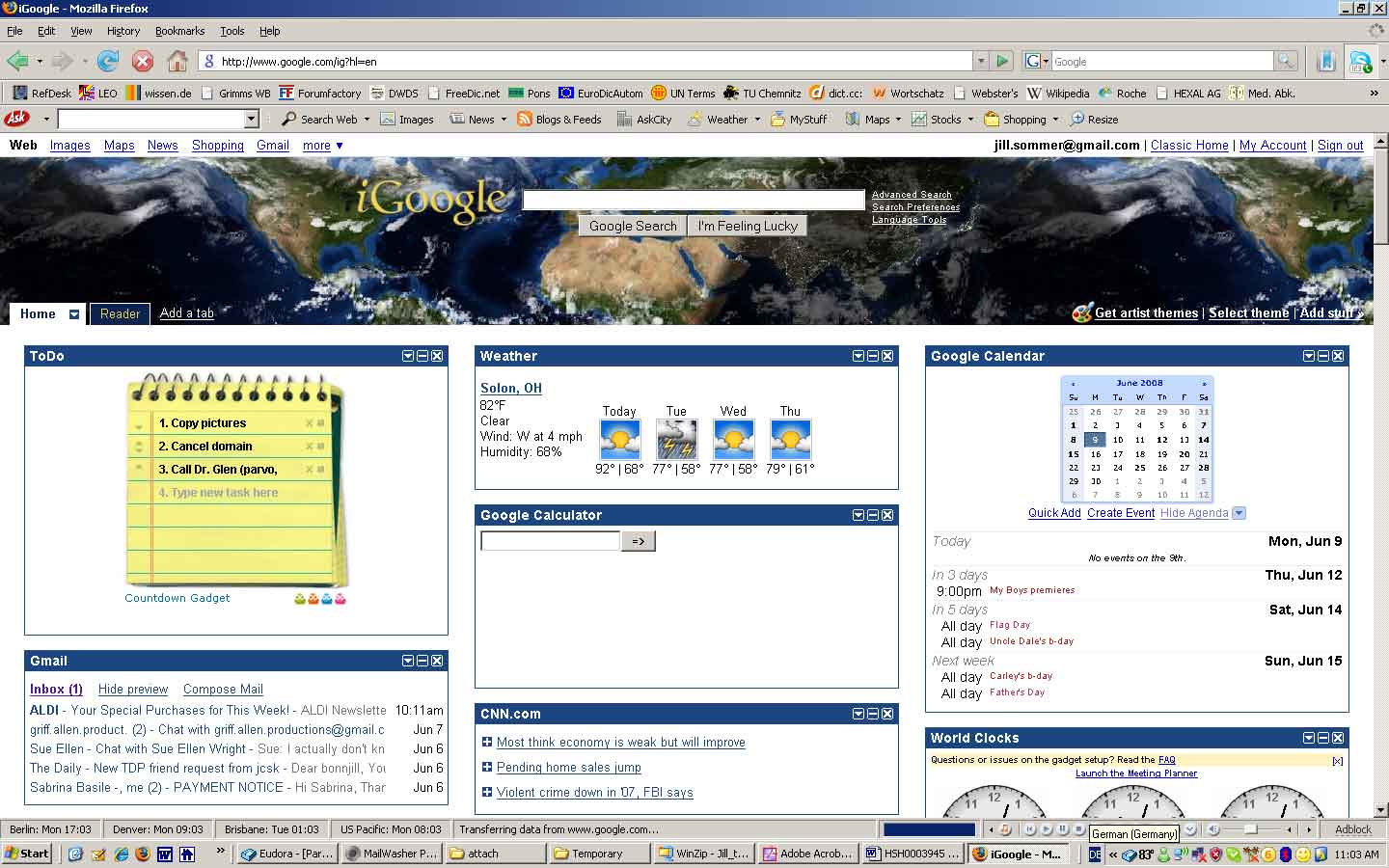
I wanted to share one of my favorite “tools” with you: the start page on my Internet browser. Google does a lot of things right, and it is a heavily relied upon tool by most modern translators. They keep coming out with more and more tools that make our lives easier, such as Gmail, Google Image, Google Reader, and Google Print. You may or may not be aware of iGoogle, its personalized Google page. You can customize this page to have all your information at your fingertips, including news sources, weather, RSS feeds, and all kinds of neat Google gadgets that make your life easier. I also have my web-based e-mail addresses (Yahoo! and Gmail), which I rarely or never looked at, built in to my iGoogle page, so I am able to see at a glance if I have e-mails in my in boxes and call them up by opening a separate tab (yes, I use Firefox!). It is available in many localized versions of Google (42 languages, over 70 country domain names, as of October 2007).
You can also jazz it up with various “themes.” With iGoogle, users can select unique themes for their Google homepage. Some of the themes are animated depending on weather conditions, the time in your area (it asks you for your location upon selecting a theme), and so on. The sky darkens/lightens throughout the day, depending on the time. They also offer “artist themes” by professional artists. I have chosen a world theme called Earth-light. It is a photorealistic simulated view of Earth from space, including seasons, day/night, clouds, and city lights.
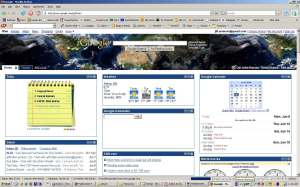 My favorite gadget by far is the Google Calendar. By having it on your iGoogle page, you can access your calendar from any computer in the world. It is a great way to track your plans, birthdays, important deadlines, appointments, personal reminders, etc. You can add additional calendars to fit your needs. For example, I have the American and German holidays, the Jewish holidays, the phases of the moon, and a fiscal week calendar (because German clients frequently refer to “Kalendarwoche” or KW (fiscal week) and it saves me from having to calculate it) added to my Google Calendar.
I have arranged my page in order of importance (to me). All you have to do is drag the window to where you want it on the page. I have a ToDo list, the weather, and my Google Calendar, Google Calculator and the World Clocks gadgets at the very top of the page. Below that I have various news feeds such as CNN, USA Today, BBC News, the Drudge Report, the NY Times, NPR, Wired, and German news feeds such as Spiegel Online, Financial Times Deutschland, heute-Nachrichten, and ZDNet. Interspersed throughout the page I then have fun little add-ons such as a Wikipedia search bar, a PeopleSearch bar, MapQuest, Moon Phases, a Bush countdown bar, a Snopes.com window called Fact or Fiction to be aware of various Internet hoaxes, and LabPixies radio (to stream Internet radio from anywhere in the world – more on that another day). I also have some entertaining gadgets, such as my Daily Horoscope, a Biorhythm calculator, a currency converter, several crossword puzzles, and a couple fun little games for when I need a quick break from translating – to name just a few.
This is how I can easily keep up to date with numerous web sites and have lots of tools at my fingertips without having to remember each and every URL or visit a bunch of sites first thing in the morning to catch up with what is happening in the world. If you haven’t tried it, give it a try as soon as you can. I guarantee you’ll be immediately hooked!
Posted by Jill (@bonnjill) in Business practices, Translation Sites.
Au contraire! I, like you, thought I didn’t need a job tracking system. When you are first starting out it is easy to keep track of the jobs because you may only have one or two. You may not think you need a job tracking system right now, but once things get busy and you completely forget about a job you agreed to take when you were stressed out with another job and/or forgot to write it down somewhere, you will definitely implement one! I’ve been there and I know of what I speak. I have forgotten two jobs in the thirteen years I have been doing this, and both times I was absolutely mortified. Luckily I had good relationships with the clients and was able to save our relationships. The first time I offered a substantial discount and busted my rear end to get the file done as soon as possible. The second time they decided to do it in-house, and the situation involved a lot of groveling and apologizing on my part… I’m still working with both clients – and the last job I forgot was back in November 2006.
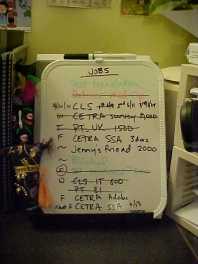
There are numerous systems translators use to track their jobs. As you can see, I use the old-fashioned, yet oh so handy, dry erase board. It’s a tried and true method to track jobs and note deadlines and estimated word counts, and it gives you the added satisfaction of crossing a job off once you have finished the job and sent the invoice (the same day you deliver the job – or at most the next day. Don’t put it off or you’ll forget!!!).
As I mentioned before, one of my German-English colleagues uses Post-It notes on her monitor to track her jobs. Here are some other options you may not have thought of…
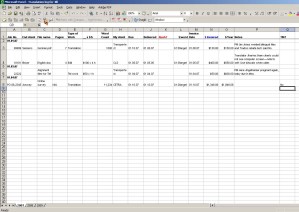 An Excel spreadsheet is an excellent tool to track your jobs and keep a running tally of how many words you have translated in a year. The graphic to the right may be difficult to read, but basically it contains the job number, end client, file name, pages, type of work (editing or translation), _x$h, word count, actual client, due, delivered, rush?, $/word, invoice date, $invoiced, notes, and TM. You can adapt this to fit your needs. You may want to include a column for date paid, late? (or days late), etc. I particularly love that it tracks the words you have translated for that year. You can also use all kinds of formulas to automatically add it up for you if you like that kind of thing. The sky’s the limit!
Another tool that is especially designed for translators is Translation Office 3000. This project management, accounting, marketing, word count, dictionary, etc. tool quickens, simplifies and optimizes a translator’s day-to-day work. You can keep track of your jobs, track your outstanding invoices, note your quotes and easily convert them into a job, handle your client contact information, and count your files based on lines, words, characters, etc. – all with the help of this tool. I particularly like the ability to track contact information and the visual schedule so you can see when a job is overdue. I don’t like the fact that you have to first create a project and then enter a job, but others may find it very helpful. You can download a free 30-day version here.
Some other options that were suggested to me when I forgot the job were:
3) a web calendar with automatic reminders (e.g., Freemail Kalender at
http://web.de)
I use a web calendar as well (more on that another day when I talk about iGoogle), but I haven’t gone the extra step and entered due dates in it. My job board is perfectly sufficient for my needs – provided I am diligent about writing a job down as soon as I accept it. It’s become habit now, which is quite comforting.
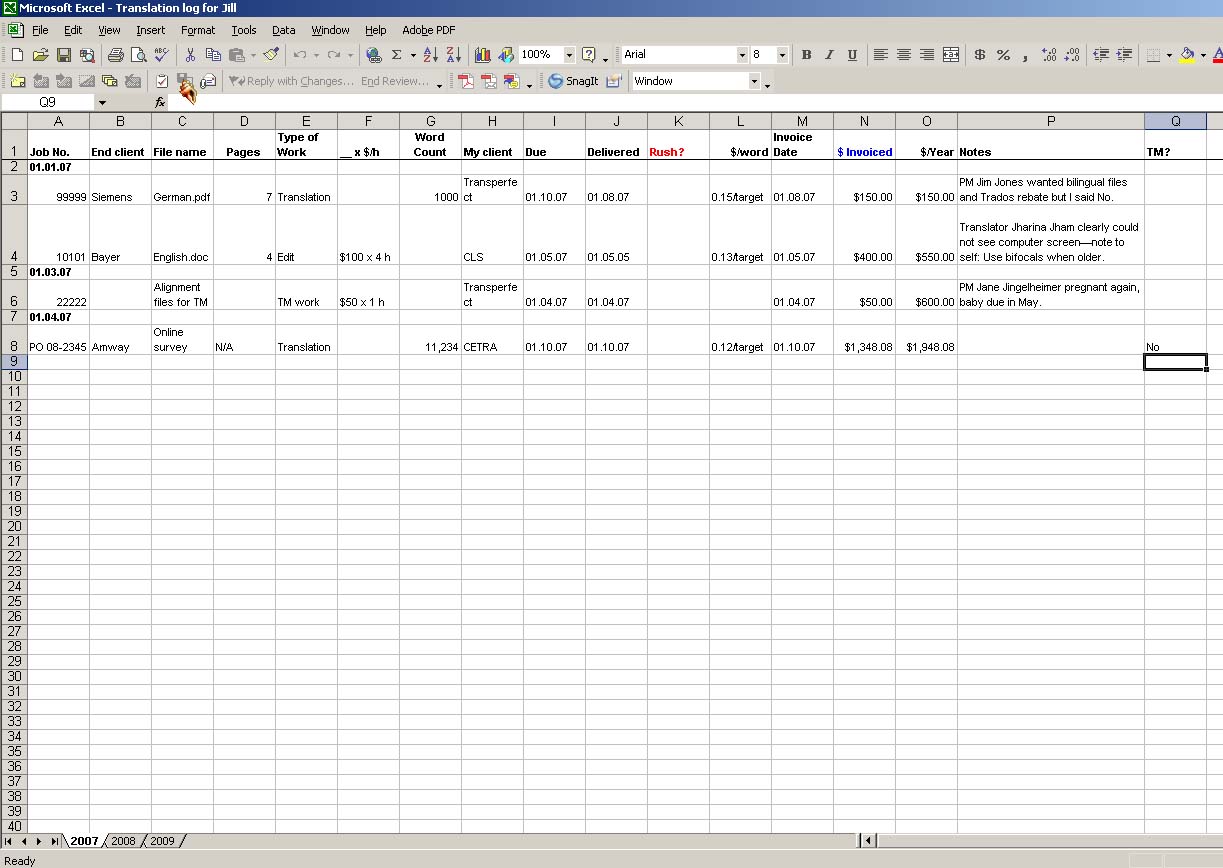 An Excel spreadsheet is an excellent tool to track your jobs and keep a running tally of how many words you have translated in a year. The graphic to the right may be difficult to read, but basically it contains the job number, end client, file name, pages, type of work (editing or translation), _x$h, word count, actual client, due, delivered, rush?, $/word, invoice date, $invoiced, notes, and TM. You can adapt this to fit your needs. You may want to include a column for date paid, late? (or days late), etc. I particularly love that it tracks the words you have translated for that year. You can also use all kinds of formulas to automatically add it up for you if you like that kind of thing. The sky’s the limit!

 Musings from an overworked translator