Ten Characteristics of a Good Client (Freelance Folder) March 9, 2009
Posted by Jill (@bonnjill) in Business practices.add a comment
I’ve really been enjoying Twitter since I installed TwitterFox. One of the translators I follow mentioned a blog post on Freelance Folder, so I checked it out and subscribed to the blog. The blog is targeted to entrepreneurs and freelancers in general. Today’s blog post, Ten Characteristics of a Good Client, is very applicable to freelance translators and their clients. Be sure to check it out , and I hope that your clients meet all ten of these characteristics.
Every Term Matters (Global Watchtower) March 7, 2009
Posted by Jill (@bonnjill) in Translation Sites.1 comment so far
This is sure to be one of those news tidbits that every translation blogs picks up and runs with, but I believe when it’s done right there is no need to repeat it here. Nataly Kelly and Renato Beninatto of the Global Watchtower were the first bloggers to report on Hillary Clinton’s linguistic faux pas on a gift to Russian Foreign Minister Sergey Lavrov. The State Department left out a few crucial Cyrillic letters, changing the entire meaning of the word. I highly recommend reading their blog post on the subject. Hey, mistakes happen to everyone. Unfortunately it seems a lot of language-related mistakes happen to our government :-P.
TGIF: Berlitz La Bamba March 6, 2009
Posted by Jill (@bonnjill) in Fun stuff, TGIF.1 comment so far
It’s Friday. That means it’s time for another language-related video. This time it’s the Spanish fraction’s turn to enjoy a little humor (well, actually everyone because this is a pretty well-known ad even amongst those of us who don’t know Spanish). This Berlitz ad was a Cannes Lion finalist and won a silver medal at Epica 2006. Enjoy!
Firefox speed-up tip from Jost March 6, 2009
Posted by Jill (@bonnjill) in Tech tips.2 comments
If you don’t subscribe to Jost Zetzsche’s biweekly Tool Kit newsletter, you probably missed this excellent tip in his latest edition, which just went out last night. If you don’t subscribe to this helpful newsletter written for translators by a translator, you really should. He talks about all kinds of important topics and offers lots of valuable tips. He has introduced me to numerous tools that make life as a translator easier. You can subscribe by clicking on this link. The Standard edition is free (with limited content), but the Premium edition is only $15 a year and so worth it. Go subscribe now!
Firefox Speed-Up
I recently complained about the increasing sluggishness of Firefox with an ever-larger number of plug-ins. Dominik Kreuzer reminded me that this might be due to the “automatic updating of installed add-ons enabled — that slows down the program start a lot.” And he was right on.
I had to look a little, but I eventually found the option to disable the automatic update under Tools> Options> Update. This was a much-appreciated tip and a good recommendation if you have lots of little add-ons in Firefox that make it ever-slower to open your browser.
I immediately changed the setting in Firefox and immediately noticed a difference in speed. Thanks, Jost!
Applications I can’t live without March 5, 2009
Posted by Jill (@bonnjill) in Tech tips, Tools.9 comments
1. Trados
Translating with Trados (or any translation environment tool – TEnT) makes life a lot easier. It allows me to quickly look up terms (in MultiTerm or using the Concordance function) and easily align previous translations and feed my translation memory, which makes my life a lot easier in the long run. It also ensures that I don’t accidentally skip a sentence or a paragraph, because the tool treats every sentence as a separate translation unit. I have numerous TMs (translation memories) set up for the various fields I work in or for specific clients. This ensures there is no cross-contamination. However, I know several translators who simply work with one large TM and specify the fields in the project field. If you would like to learn more about the various TEnTs and take them for a test drive, be sure to check out Jost Zetzsche’s Translators Training site.
2. Microsoft Word
Although I also own WordPerfect, 99.9% of my translations are delivered as Word .doc files. I have become adept at tweaking formatting and playing with the ruler to set tabs and line up margins. Translators simply need to delve into the inner workings of Word in order to deliver the best possible translation to their client. Take it from me, clients notice when you deliver a translation that closely matches the formatting of the original. And a happy client means a return client.
I own a lot of dictionaries, but the ones I find myself using the most are electronic dictionaries. I have two electronic dictionary interfaces that I use — the Langenscheidt dictionary interface and UniLex. It is so much quicker and easier to highlight a word in Word or on the Web and use a keyboard shortcut to paste it into an electronic dictionary interface. For more information on the German-English electronic dictionaries I use (and to view screenshots of them), click on the Electronic dictionaries header. I also rely on online dictionaries such as Pons (they also have French, Spanish, Italian, Polish, and Russian dictionaries available), the Pons Bildwörterbuch, Leo (also available in French, Spanish, Italian, and Chinese), dict.cc, LinguaDict, Grimms Wörterbuch, Wortschatz, Das digitale Wörterbuch der deutschen Sprache, and the EU’s multilingual terminology database IATE (formerly known as Eurodicautom).
 4. Skype
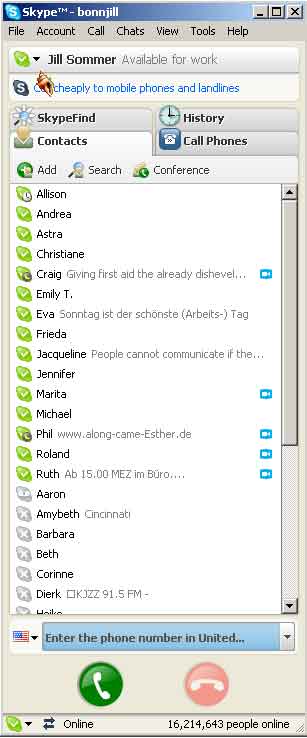
Skype has become an indispensable tool in my translator toolkit. I am connected to fellow translators and several of my project managers through Skype. If I have a sentence that is giving me trouble I simply copy and paste it into Skype’s chat window and discuss it with one of my colleagues. It also enables my project managers to instantly ask if I am available, receive an answer and assign the job to me. You can see the status of your contacts in the window and either call them (through headphones and/or video) or open a chat window. It also allows me to keep in touch with friends in Germany and my cousin in China.
Since I specialize in medical I receive a lot of my medical texts in PDF format. ABBYY FineReader allows me to scan the file and convert it into a format that can be read in Word using optical character recognition (OCR). This allows me to quickly translate medical invoices and the like using my medical TM. ABBYY is the clear favorite among translators (although PDF Transformer is a close second), because it creates fewer text boxes than other OCR programs. I also really like the spellcheck feature, which ensures the document I am working on doesn’t have any spelling errors that would corrupt my TM. Sometimes ABBYY has problems reading handwriting or working with fuzzy originals, and sometimes its formatting leaves a lot to be desired. In this case, I simply copy the text, paste it into a fresh Word document and format it by hand. For more information and to view screenshot, click here.
6. iGoogle
iGoogle is a personalized Google page. You can customize this page to have all your information at your fingertips, including news sources, weather, RSS feeds, and all kinds of neat Google gadgets that make your life easier. iGoogle allows me to keep up with the top headlines in numerous German, UK and U.S. newspapers, my Google feed reader, numerous miscellaneous websites, and my Gmail and Yahoo e-mail accounts all in one location. I have written about iGoogle before, but it deserves mention here again.
7. Firefox
I love Firefox. It allows me to easily manage my Bookmarks and gives me a very customizable toolbar for the sites I use most (like TinyURL, my Blog, a medical abbreviations site, the PONS dictionary, ReferenceDesk, the Roche medical dictionary, a button to add any product to my Amazon Wish List, etc.). I also love the Google toolbar, so I can quickly search Google without actually having to visit the Google homepage. I also think it loads faster than Internet Explorer or the old Netscape browser (R.I.P.). Firefox also seems to be less vulnerable to security breaches. If only I could figure out how to add a second toolbar for even more favorite sites…
8. PractiCount
PractiCount is my word count tool of choice. As many of you probably already know, Word does not count text in text boxes, headers, etc. and Trados does not count numbers as words. PractiCount allows me to count a variety of file types, including Word, Excel, PowerPoint, and HTML and XML files and adjust the settings as needed. It also allows you to count multiple files at once. In the old days we used to have to open each file, do a word count and add it up by hand (and double and triple check the total). PractiCount does this for us. If you like, you can also create an invoice directly in PractiCount based on the word or line counts (whichever you specify in the settings). For more information on word counts, read Word Count Issues – Part I and Word Count Issues – Part II.
9. Microsoft Money
Whether you use Quicken, Microsoft Money or another accounting tool, you need to use an accounting tool to keep track of income and expenses. I like Money’s feature of listing overdue invoices and how many days they are overdue. MS Money also makes tax time a breeze, because I input my business income and expenses throughout the year and can easily generate a report for my CPA at tax time.
10. Time Stamp
I charge by the hour for proofreading. Time Stamp is a great little donationware tool that allows me to track the time I spend proofreading a text, and I can pause it when I take a break and easily start it again when I get back to work. And I can save the report in my archived zip file in case the client ever questions my invoice.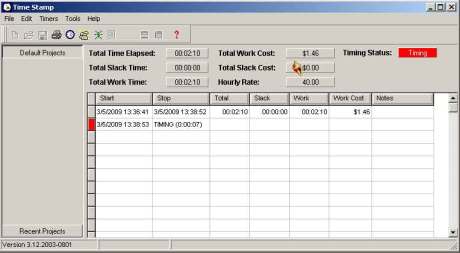
11. WordPress
It takes a special kind of person to be a blogger. You have to want to share your knowledge with others. Not everyone is willing to do that. I love blogging because it allows me to share my inane thoughts and all the tidbits I learned throughout the years with others – or even thoughts that are inspired by something I read. I used to send random thoughts and websites to the ATA GLD list, but my blog allows me to reach a wider audience. It is also a great marketing tool. Corinne from Thoughts on Translation advised me to use WordPress, and I have never regretted it. It is, by far, the most powerful blogging tool on the web today.
 12. Twitter (and specifically TwitterFox)
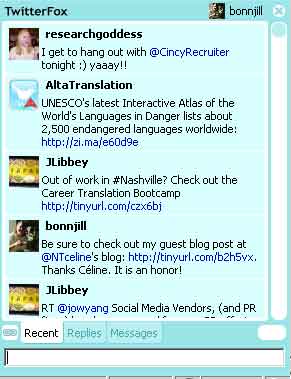
I am still learning how to use Twitter, but it became much more enjoyable once I installed TwitterFox, a Firefox add-on that feeds in Tweets in real time from my browser. Since I have Firefox open just about all the time, it allows me to quickly catch up with my tweets and interact better with the people I am following. Any Twitter feed tool, such as TweetDeck, TweetLater or Tweetie (for iPhones and the iPod touch), will suffice. TweetDeck appears to be the odds-on favorite at the moment. I also feed my latest Twitter Tweet into my blog. For more information on Twitter tools and choosing the right tools for your needs, be sure to read The Twitter Toolbox.
13. Norton Ghost
Everyone should have a backup system. My backup system of choice is Norton Ghost. It runs scheduled backups of my most important files (My Documents, my TMs, my e-mail program, etc.) every night and backs up my entire system once a week onto an external hard drive.
14. Pandora Radio
Pandora allows me to stream music based on my interests in the background while I work. Depending on my mood, I can choose stations based on my favorite singers, such as Eva Cassidy (smooth folk music) or Michael Buble (swing music), or groups such as Ah Nee Mah, which features sounds of the Native Southwest within the context of mellow ambient atmospheres, or Evanescence, which is a bit more rocking. I’ve written about Pandora Radio here twice — in Music in the workplace and Pandora Radio itself.
15. Facebook
Facebook is a favorite for purely private use. It allows me to keep in touch with friends and reconnect with long-lost friends. I have been enjoying posting photos from my Academic Year Abroad year in Salzburg for my AYA friends and have made friends with the widow of a friend that year. That said, I am very picky about who I accept as friends, as I don’t want clients to have access to old photos of me or status updates (not that there is really anything incriminating out there). Facebook is a fairly open environment, so you never know when one of your friends might publish compromising information about you or make a comment that might embarrass you. Better to be safe than sorry. If I ignore your friend request please don’t take it personally.
What are your essential applications? Do you have a few applications that you couldn’t live without? Share your favorites with us in the comments.
Check out my guest blog post at Naked Translations March 5, 2009
Posted by Jill (@bonnjill) in Marketing ideas, Random musings.1 comment so far
I’d like to invite you all over to Céline’s blog, Naked Translations, where I’ve written a guest blog post on e-mail marketing. I have been reading Céline’s blog since before I started blogging myself (she’s been blogging since November 2003). If you aren’t already familiar with it, be sure to give it a look! It’s got some great stuff. A little while ago Céline approached me about writing a guest blog post for her blog. I had mentioned my e-mail marketing campaign in one of my blog posts, and she wanted me to go into more detail about it for her blog. I have talked about this numerous times in Corinne and my preconference seminar at ATA conferences, but I was able to go into more detail on Céline’s blog. Thank you so much for inviting me, Céline. It is truly an honor.
If you no can speak Croc-ese… March 4, 2009
Posted by Jill (@bonnjill) in Fun stuff.add a comment
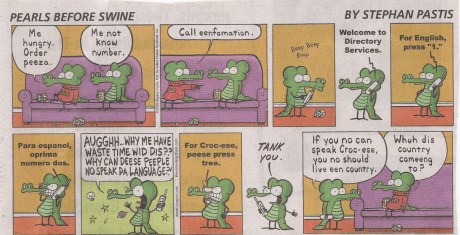
I finally got my scanner working again. It only took a couple weeks. This comic ran in last weekend’s Sunday paper. I thought it was hilarious for obvious reasons. I hate calling a company and not talking to a live person. This is a unique take on the matter. Enjoy!
“More work for less money” comic March 3, 2009
Posted by Jill (@bonnjill) in Fun stuff.1 comment so far
This was a great comic to wake up to this morning, so I definitely wanted to share it with you all. If you are interested in subscribing to this comic strip (for free), you can do that here. Most of the comics are very applicable to home-based workers.

Bilingual dreaming March 2, 2009
Posted by Jill (@bonnjill) in Random musings.1 comment so far
Q: A Cleveland reader asks “I came to the United States when I was 10 years old, speaking only Croatian. Now, 30 years later, I find I still dream in Croatian and don’t ‘get’ jokes in English. People have to forewarn me that a joke is coming. Why this lingo lag for me?”
A: Bilingual folks report a number of interesting linguistic effects in their dreams. Some seem to stay with their native language for quite a while, whereas others switch quickly, even before becoming completely fluent, says Harvard Psychologist Deidre Barrett. Most common is for these dreamers to switch from language to language, often using their later language when dreaming of present issues and their earlier language when dreaming about people from the past, childhood emotional issues, etc. As to a bilingual’s response to jokes, some jokes that are very physical or rely on tone of voice may translate well. However, some forms of humor, such as puns, rely on such a subtle sense of a language that an adult learner may not get them.
This question and answer set brings up points most people don’t really talk about. Which language(s) do you dream in? When did you stop having trouble understanding jokes? I personally started dreaming in German about one year into living in Germany (11 years after starting to learn the language but the first year I was truly immersed in the language). I usually have no problems getting jokes, but if I am really tired or it contains some obscure cultural inference it might go right over my head. But then again, some British jokes go over my head too and they are in English 🙂 How about you? Any thoughts?
5000 words March 2, 2009
Posted by Jill (@bonnjill) in Fun stuff.1 comment so far
This one seems to be making the rounds among translators this morning. Sharon Neeman obviously knows what she is singing about, although I don’t know if I could translate 5000 words of legal in a day. Perhaps 5000 words of a marketing survey for which I barely have to look up any words sure, but not 5000 words of legal. And the word count keeps growing… My hat’s off to her! Although if I were in her position I would have done some client education :-). Be sure to watch all the way to the end. The last ten seconds are the best part!!!
Thanks to Ted for sharing it with the ATA German Language Division list this week and Per for posting it on PT! I definitely had to share it with you all in case you missed it!


 Musings from an overworked translator