TGIF: The Dalai Lama walks into a pizza shop… June 16, 2011
Posted by Jill (@bonnjill) in Fun stuff, TGIF.8 comments
Chris Durban shared this little video with me, which a friend of hers in Australia sent her, because she thought it would make a good TGIF video. As Chris explains, it is “a good example of a cultural mismatch, with (as he [her friend] put it) “the joke being on the Australian TV presenter trying to be funny.” :-)” For those of you who don’t get it either, I will explain the joke below the video window.
My favorite line is “You know that a joke’s in trouble when you’ve got a translator off to the side.” Truer words have never been spoken.
To those non-native speakers who, like the Dalai Lama, have no idea what he’s going on about, the joke is when he says “make me one with everything.” It’s a pun (meaning it has 2 meanings): 1) Make me a pizza with everything 2) Make me at harmony with everything (which according to the Buddhist tenet the ultimate goal is to become one with the world and be at peace through meditation.
E-mail etiquette 101 June 13, 2011
Posted by Jill (@bonnjill) in Business practices, Tech tips.19 comments
I received an e-mail from a translation agency today informing me that they have made some recent changes to their Vendor Portal. They sent the e-mail to all the vendors in their database. Do you know how I know this? I then proceeded to get e-mails from their vendors from all over the world because they hit Reply All simply to say “thank you” to the person who sent the e-mail. I’m about ready to set up an e-mail filter to filter the replies to that subject line straight to the Trash. I don’t have the time or energy to delete hundreds of e-mails today (and since this is one of the Common Sense Advisory’s “top 20 translation agencies” there must be thousands of vendors…).
Sounds like some professionals need some schooling in e-mail etiquette. Here are my top 15 e-mail etiquette tips. If I missed one please feel free to share in the comments.
1. Use a subject line. I hate receiving e-mails with no subject line at all. I can’t believe people still do this.
2. Understand the difference between To:, CC: and BCC: and please use CC: and BCC: sparingly. And while I have your attention, don’t use Return Receipts on every single email. I decline them as a rule.
3. Do not hit Reply All unless you truly want to reply to every single person listed in the e-mail header. If one of the e-mail addresses is a generic one, do everyone a favor and delete it before you hit send.
4. Be polite at all times and be mindful of your tone. E-mail is a medium that too easily creates misunderstandings. Use sarcasm sparingly. If something gets “lost in translation,” you risk offending the other party. The more matter-of-fact you can be, the better.
5. Keep your e-mails brief and to the point. We all know people who write diatribes to listservs. I don’t know how they get any work done!
6. Reply in a timely manner. Even if it is a simple “thanks for your inquiry, but I am afraid I am booked up through the rest of the month.”
7. Don’t use e-mail to criticize others (or complain about a third party). Criticism is best conveyed in person or over the phone so that you can immediately mitigate any misunderstandings. Plus, you never know what might happen with your e-mail after you hit send and it arrives in the other person’s e-mail address. Worst case scenario: your e-mail will be forwarded to the third party in question. Ouch!
8. Don’t reply to an e-mail in anger. Write the e-mail and walk away from it for an hour or two (or a day or two) until you’ve had a chance to cool down. Better yet… vent your feelings by writing the e-mail and then hit Delete instead of Send.
9. Don’t forward chain letters. Nine times out of ten, the information is an urban legend. Just don’t do it! If in doubt, check it out at Snopes.com, a website devoted to tracking down and debunking urban legends and rumors.
10. Don’t write in ALL CAPS. This is the digital equivalent of shouting. No one likes to be shouted at.
11. Include your full name and contact information in your e-mail signature, but keep it to 4-5 lines. Also, if you are participating in a listserv please use your given first name so people know who they are dealing with. I have seen people sign their e-mails to listservs with an initial or, even worse, a pseudonym.
12. Don’t send or forward emails containing libelous, defamatory, offensive, racist or obscene remarks. It seems self-evident, but surprisingly it happens.
13. Remember e-mails aren’t private. E-mails sent to a listserv go to everyone on the list. E-mail can be intercepted and read by just about anyone if they choose to do so. Think of e-mail as being the equivalent of sending a postcard through the mail.
14. Use your spellchecker. Nothing reflects on a language professional worse than an e-mail riddled with grammar errors and typos.
15. Reread your e-mail before sending it. Better yet, read it out loud. Make sure you are communicating clearly and that no words have been accidentally dropped in your zeal to write down your thoughts.
For more e-mail etiquette tips, check out 101 Email Etiquette Tips. Your clients and colleagues will thank you!
Words of wisdom from Adam@Home June 13, 2011
Posted by Jill (@bonnjill) in Fun stuff, Random musings.add a comment
As some of you regular readers may know I subscribe to GoComics’ Adam@Home comic strip. This means I get the comic every morning as an e-mail. I (and probably most of you) can relate to Adam because he also works from home as a freelancer and loves his coffee. This Sunday’s comic strip was too good to not share…
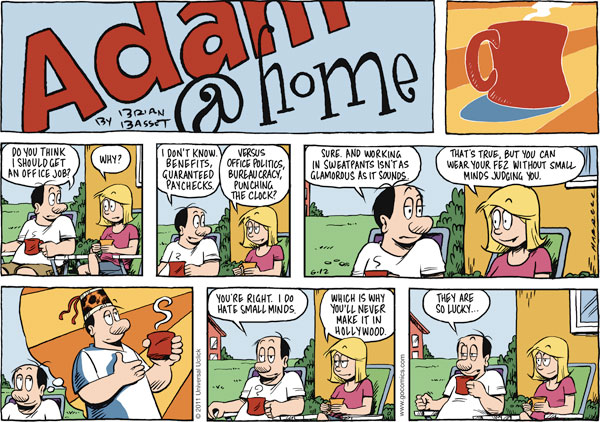
Several of my colleagues have confided in me that they are thinking of taking office jobs for the steady paycheck, social interaction, etc. If you consider doing this you should weigh all the pros and cons. It takes a special kind of person to work and succeed as a freelancer. Not everyone has the discipline to make their deadlines and market themselves when things are slow. But I for one love freelancing and all that it offers. I love being able to translate my texts and then take the rest of the day off if I can. In fact, I plan on doing that today. I have some gardening I need to do and my library book (Unbroken: A World War II Story of Survival, Resilience, and Redemption by Laura Hillenbrand) is due in two days. With only about 1,500 words to translate today I should be done by 1 or so… I hope you all enjoy your Whit Monday (or if you’re in the U.S. your Monday…)
Just when I thought I was out… they pull me back in June 9, 2011
Posted by Jill (@bonnjill) in Random musings.5 comments
I have been your typical overworked translator in the last month or so. In May I earned double my target. June doesn’t look to be any slower. My number one client is keeping me very busy – with all 4 or 5 PMs contacting me, luckily not all at once but several a day. Plus, several other clients have been sending me jobs as well. So I was happy that Monday and Tuesday were “kind of slow”. I had hoped to enjoy a slow week and catch up running errands, cleaning the house, etc. Plus, Tuesday was my sister’s 40th birthday and my niece’s graduation from pre-school, so Tuesday night was spent with my family. Today I had all my translations delivered by 11 and was looking forward to taking the rest of the day off to rest for my incredibly busy day tomorrow (I’m tired just thinking about everything I have to do tomorrow!). So you can imagine my dismay when I received an e-mail from #1 client with a 2,000 word job for tomorrow EOB. But I happily accepted the job and am busy translating a survey about car brands. Of course I took an hour or so off to run my errands, because my cupboards were BARE and I was completely out of cat food (only 1 bowl left). Bailey would not have been a happy camper! As for the cleaning, it can wait until the weekend (or I may just use my Groupon and call a cleaning service).
Even with things being “slow” this week I’ve still managed to translate 10,860 words so far this month (and that isn’t counting the 2,000 word survey I’m working on today)… Life is good!
TGIF: Bradley Cooper speaks French? June 2, 2011
Posted by Jill (@bonnjill) in Fun stuff, TGIF.7 comments
Who knew? This video is being featured on all the Hollywood gossip blogs I follow and is being met with shock that Bradley Cooper is fluent in French.
As my favorite blogger stated:
I think as Americans, we are used to everyone only speaking English. We cannot fathom that everyone in the world does not speak English and I think we are equally as shocked when someone from America who does not actually come from another country can speak a language fluently other than English. And no, asking how much a beer costs in Spanish is not being fluent.
So, to be a stereotypical as the world sees us American, I was shocked to discover that not only does Bradley Cooper speak French, he does it brilliantly. I promise that even though you might not understand a word of this, you will have a new found respect for Bradley Cooper. Not for the way he treats women, you will still have that bias, rightfully so, but for the language ability. I have watched this thing like five times already.
We know that it isn’t that shocking for someone to speak another language, but it is rare that an actor – let alone a very well-known actor – can speak another language and do it well. At least I am assuming he does it well. Well, fellow French speakers, what say you?
TGIF: Uma Thurman markets Schweppes in France May 27, 2011
Posted by Jill (@bonnjill) in Fun stuff, TGIF.1 comment so far
Celebrities market products overseas all the time. It’s a great way to make some cash while cashing in on their popularity. Arnold Schwarzenegger crazily hawking some product in Japan is a favorite I posted two years ago here on the blog. This sexy ad featuring Uma Thurman is a Schweppes commercial that is currently airing on French TV. In the ad Ms. Thurman can’t stop huskily explaining her wanton desire to have Schweppes constantly, with anyone, anywhere. This kind of commercial would be accompanied by all kinds of protests by the prudes in the U.S. 🙂 Enjoy!
10 Productivity Tips for the Mobile Translation Professional – Ana Iaria @ TCD May 24, 2011
Posted by Jill (@bonnjill) in ATA, Tech tips, Tools.4 comments
Translators truly are the epitome of mobile professionals. We can live and work from anywhere as long as we have a computer and an Internet connection. Ana frequently works on several continents a year, so her session on productivity tips for the mobile professional was chock full of tips to make working anywhere as easy and productive as possible.
Tip 1: Have a portable computer
There are various models, sizes and prices as netbooks or laptops. It is up to you to choose whichever computer you feel comfortable working on. Netbooks are not as easy to type on as laptops, but they can be quite handy if you are simply traveling and want to stay connected. Ana suggests a MacBookPro as a second computer, because then you can have both Windows and Mac. Be sure to install all the software you need to work on it (TEnTs, Office products, electronic dictionaries, etc.) – “don’t keep it as a bare-bones computer.”
Tip 2: Keeping time and time zones
Keeping track of the time zone you are in and the time zones of your clients is of paramount importance. Ana’s first suggestion was a time zone converter that does not rely on an Internet connection. Her favorite bookmark is World Clock, which also offers a iPhone app. Windows 7 also allows you to add an additional clock to your system. If you work with a Mac, she highly recommends using the VelaClock widget.
Tip 3: Gadgetry for your computer
* Flux is a screen dimmer that works with sunset/sunrise and changes the computer monitor to reduce glare on your eyes.
* If you work with Firefox there are all kinds of add-ons to make your life easier (drop-down dictionaries, add-ons like FoxClock, Xmarks, MultiRowBookmarks, etc.).
* Ana recommends buying what she calls a “bag of tricks”. It is an organizer called Grid-It that allows you to carry your external mouse, converters, cables, pen drives, etc.
Tip 4: Mobile communications
A smartphone is a must for a mobile professional. It allows you to check e-mail, use apps that make your life easier while traveling, and keep in touch with clients. If possible, get a SIM card for the country you are in so you can make and receive calls. A Skype number is also a very good solution. Someone during the presentation suggested using MagicJack to make inexpensive international calls in the United States and Canada.
Tip 5: Online storage and backup
Sync software is important to ensure your computer always has the files you need. Mac has a tool called Time Machine that allows you to sync your computers. Dropbox is another tool that allows you to easily move between computers or store files online for easy access. Adrive or Yousendit were other suggestions to store and share large files.
Tip 6: Working with WiFi
WiFi has revolutionized how we stay connected. Ana recommended several WiFi locators such as Fon (with which you buy a dongle and share WiFi with people all over the world who have offered to share their WiFi) or Total Hotspots. Another WiFi finder is Jiwire. Skype offers the Boingo network. Ana recommends scouting the WiFi spots before you leave for your destination and printing them out if necessary so you are prepared. Another option is to get a Starbucks card, which allows you to use WiFi at any Starbucks. If you are travelling in your country considering tethering your laptop to your mobile phone (be sure to check your contract first).
One word of warning though – be aware of open networks. If you are on an unsecured network don’t log into your bank’s website, for example. Also be sure you are running malware detection programs and anti-virus software on your computer at all times. You are as safe as you want to be.
Tip 7: If you are traveling for leisure
* Don’t overwork yourself
* Take some time off to visit places. Don’t hole yourself up in the hotel. Go out and see the sights and visit friends/family. (I am particularly guilty of this. I was translating a cookbook when visiting a friend in Munich. I worked during the day while he worked. I think I only took one day to be a tourist. Sure, I had already been to Munich several times, but that one afternoon off sitting in a café at the palace was very refreshing.)
* But always be available to your clients. Even if you are on vacation a short e-mail thanking them for the inquiry but explaining you are currently unavailable – and perhaps recommending a colleague – goes a long way to keep your customer happy.
Tip 8: If traveling for business/conferences
* Make the most of the conference
* If meeting clients, point out that you are working on the go, you can score a point or two.
* Don’t forget to network – and work
* Enjoy the social side of it as well
Tip 9: Don’t forget the productivity tools you use at home
* Have the same software on all computers – TEnTs, dictionaries, Office, any Open Source programs, etc.
* Olifant helps you create and maintain translation memories (TM) files (conversion, editing, etc.). Olifant is a .NET application that allows you to load or import translation memories in different formats (such as TMX or tab-delimited); edit the translation units, their attributes and any other associated data; and save or export your data in various formats.
* Apsis Xbench is an integrated reference tool aimed to provide a clear and structured view of the terminology of any translation project.
* Electronic dictionaries
* You can keep your reference files on your virtual drive folder
* Password manager or export
Tip 10: Check your list before going mobile
Ask yourself if you have your
* Computer
* Cell phone
* Storage
* WiFi finder
* Bag of tricks
PC World: Google Docs Translations Don’t Make Sense May 18, 2011
Posted by Jill (@bonnjill) in Random musings, Translation.4 comments
A reporter at PC World is doing a series on Google Docs, and today he took a close look at their claim that they can “easily translate documents into 53 different languages.” He asked his bilingual Twitter followers for help, sending them an English document and its Google Docs translation and asking them what they thought. The results were hit or miss. English and French was passable, but English and Hebrew was “one big disaster.” He also tested Arabic, Spanish and probably several other languages. He summed up the results by saying, “Suffice it to say, I wouldn’t blindly trust any translation done by Google Docs. Obviously, the translations feature in Google Docs needs some work, and Google could start by making it at least as good as the translations done on the translate.google.com site.” Feel free to add your comments to the article 😉
When you assume… May 18, 2011
Posted by Jill (@bonnjill) in Business practices, Random musings.7 comments
You all know the saying – and for those of you who don’t… “When you assume, you make an ass out of you and me.” I don’t know what is in the air today, but I have had two clients send me files for translation (needed back as soon as possible – of course) assuming I am available. One particular client in the Czech Republic sent me an e-mail at 2:30 in the morning (8:30 a.m. in Europe) and his colleague in China proceeded to send me the files to work on – and the files again because they had been updated and could I please use them. BTW, this was a client I fired last year… The second one just sent a PDF with the text they needed highlighted in a red box. Lots of single words (I think the context is chemistry but I’m not sure. And I don’t do chemistry.) in a QA form with no other context. And it isn’t even noon yet!
I am waiting on a large job that I was booked for two days ago, so I politely thanked both clients and told them that I was unfortunately booked and unavailable.
The grass is not necessarily greener on the other side… May 16, 2011
Posted by Jill (@bonnjill) in Business practices, Random musings.4 comments
I did a really dumb thing last week – I switched Internet service providers. I have been unhappy with my Internet connection through Time-Warner Cable for a while now. It has never been very fast and recently it started kicking me offline 3 to 4 times a day. The connection would be glacial until I was booted offline. I would then have to reboot my cable modem and router. I called a service tech, who came out and told me I was losing the connection somewhere on the line, but he never actually fixed the problem and I never heard from TWC again.
I was ripe for the pickin’ when a U-Verse salesperson came door-to-door in early May. I decided to sign up for Internet and cable through U-Verse. I should have left well enough alone…
After two install no-shows and numerous phone calls to “customer service” in which they told me they could install it in a little over a week I tweeted my frustration and a rep from AT&T contacted me and scheduled an install two days later. The tech showed up on-time and things looked promising. I loved the U-Verse set-up and the DVR that allowed me to watch the shows in the living room or the bedroom. The tech had problems getting one computer online, but Susanne Aldridge III quickly helped me solve that problem. The only problem that remained was my inability to send e-mail from my e-mail program.
Then my landlady came home from work – and had no phone or Internet service. After calling the supervisor and Mike at HQ I had two techs back at the house to fix the problem. They had turned off her service when mine was installed because there was a mix-up with our addresses. When they left everything looked great.
And then everything went to hell. My landlady had her Internet turned off Friday night, and after calling AT&T Saturday morning and them confirming everything with me I woke again an hour later to find I had no cable or Internet – and neither did she. She was on the phone with them for 2 hours and I was on hold for an hour trying to figure this out. Turns out some yahoo turned off our services pending “address verification” and it would take 48-72 hours (business hours – so starting Monday) to get service turned back on. As you all know, we can’t work without Internet so I called Time-Warner Cable in tears begging them to take me back and had a tech out this afternoon (Monday) who reinstalled everything. In the meantime, AT&T also turned off my landlady’s phone service in addition to her DSL. It was a looooong weekend…
Everything is working on my end again, and I am shipping the U-Verse equipment back first thing in the morning. I have a new “drop” (the technical term for the line from the pole to the house), so my Internet connection appears to be faster. I don’t have a DVR, but I can watch cable in my bedroom through my old VCR. I’m not complaining, because TWC’s customer service is a million times better than AT&T’s. I’ll live with it.
My landlady went out and bought a pay-as-you-go cell phone, and I will be hooking her into my Internet tomorrow until AT&T fixes her service. She is considering telling them to go fly a kite too.
So the moral of this story is even though it may seem like it, the grass is not necessarily greener on the other side. At least my blood pressure is back down, and I am calmer again.
Update: My landlady now has her phone and Internet working, but it took a week!!! That is simply unacceptable in this day and age.


 Musings from an overworked translator